
File diagnosis with owned examples
Why Are Objects Missing After Importing a 3MF?
A 3MF can store mesh resources that are not placed in its build, reuse one resource for several placed items, or position a part outside the visible area. Fewer visible parts after import therefore needs a build-and-placement check before mesh repair. Hidden or disabled state in the authoring application is another thing to verify; it is not a universal 3MF display rule.
Count resources and placed instances separately
The Core Specification separates reusable object resources from the build items selected for manufacturing. A resource count is not the expected visible part count. Components can reference resources, and transforms affect final positions. A successful import of some geometry does not prove the receiving application supports every extension or project setting.
Owned two-part example
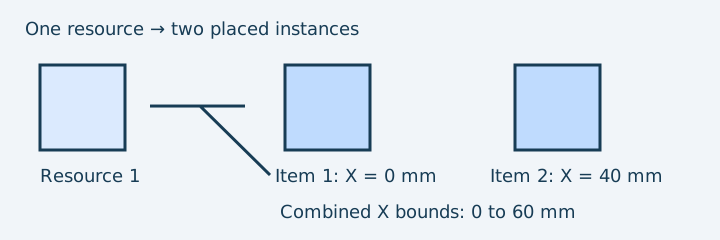
Download the two-placed-cubes control. One reusable 20 mm cube resource appears twice in the build: X = 0 and X = 40 mm. Expected resolved bounds are 60 × 20 × 20 mm and two disjoint shells. A companion one-placed-cube control keeps the same resource but places it once: bounds 20 × 20 × 20 mm. These are mathematical software fixtures, not printed parts.
- Open the untouched package in its original application and record expected placed parts and visibility.
- Run 3MF preflight or the local collection checker on both controls. Confirm the declared unit, resolved bounds and build-item warnings.
- If the receiving application shows fewer parts, zoom to the whole scene and inspect its object/plate list, selection, visibility and disabled print state.
- Compare transforms and any recentering or below-bed placement. A part can exist without being visible at the current view.
- Check supported extensions and original application version. Re-export a basic mesh-based build on a copy only when required.
Choose the next action from the observation
| Observation | Interpretation to test | Action |
|---|---|---|
| One resource, two build items | Resource reused as two instances | Check both placements; do not delete one as a duplicate |
| Resource present but absent from build | Stored geometry is not selected for this build | Ask the author whether it should be placed |
| Expected count but extreme bounds | Transform or scale moved a part | Compare original placement and known dimension |
| Unsupported extension reported | Importer may lack required geometry semantics | Return to original application or use a supported export; keep the source |
InspectMesh resolves supported mesh build geometry; it does not validate every application-specific hidden state or extension. Two shells do not establish two valid solids, and the collection volume is intentionally unavailable for multiple-shell interpretation. For general import failures, use 3MF slicing diagnosis; for geometry-only delivery, review conversion losses first.
Source and next step
The Core Specification resources and build sections were reviewed on 7 October 2026. The controls use core mesh semantics and no optional extension. Compare intended parts with the original project before accepting a re-export; when design intent is uncertain, consult its author rather than reconstructing missing objects.
FAQ
Does one resource mean one visible part?
No. The build can place a reusable mesh more than once, or not place it at all. Compare build items and transforms with the original project.
Does conversion recover missing parts?
No. A geometry export resolves supported selected build geometry; it cannot recover missing intent or unsupported extension data.