
Practical job planning
3D Print Lead Time vs Print Time
Print time is a selected machine-run duration. Lead time includes the wait until work can start and the other steps required for the agreed delivery scope. A sum of sliced runs is useful arithmetic, but it is not an unconditional completion or dispatch promise.
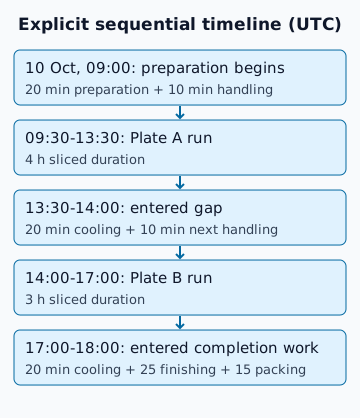
One explicit hypothetical timeline
The diagram uses UTC on 10 October 2026 and one available machine. Preparation begins at 09:00 for 20 minutes, followed by ten minutes of first-plate handling. Plate A starts at 09:30 and runs for four hours. Then a user-entered 20-minute cooling gap and ten minutes of next-run handling put Plate B at 14:00. That run lasts three hours. Another entered 20-minute cooling gap, 25 minutes of finishing and 15 minutes of packing end at 18:00.
All durations are hypothetical planning inputs. The two cooling intervals are not process recommendations. Use the actual material/process guidance or an explicit justified estimate. The seven sliced hours do not include those additional steps. Inspection is assumed included in the stated handling/finishing; assembly and dispatch transit are excluded.
Reconcile elapsed time without counting twice
From a 09:30 first-run start, seven sliced hours plus 90 minutes of explicitly entered gaps and completion work give 18:00 UTC. From the 09:00 preparation start, include 120 additional minutes instead. Choose one start boundary and record it. Do not add a warm-up or cooling allowance twice if the selected source duration already includes it.
Use the finish calculator for elapsed-time arithmetic. Apply the offered sequential duration only after setting the start and timezone and reviewing correction/additional time. The recipient preserves those entries. An observed correction factor from comparable runs may adjust sliced duration; it is not a universal printer-speed factor.
What still needs a scheduling decision?
| Dependency | What to enter or agree | What the duration sum cannot establish |
|---|---|---|
| Machine availability and queue | Actual start and explicit gaps | That the machine will be free |
| Cooling or curing | Process guidance or user estimate | A universal safe waiting interval |
| Finishing, assembly and inspection | Scope and elapsed time, including waits | Accepted quality or physical fit |
| Customer approval or another iteration | Decision boundary and contingency | That the first attempt succeeds |
| Packing, collection and dispatch | Cut-off, available service and agreed scope | Transit arrival from machine completion |
Repeated runs and multiple machines
Two unchanged four-hour runs selected sequentially contribute eight sliced hours. Re-slice if arrangement or profile changes. With several machines, run overlap depends on availability, operator tasks and dependencies. This tool does not optimise multi-machine allocation or monitor printers. Do not divide total hours by printer count and call the result a validated schedule.
Keep quantities and outcomes separate
The batch job record holds requested and planned quantity. Accepted, rejected and missing results remain unknown before production. A rejected part can require a new run, another inspection and a changed completion estimate. Budgeting a financial failure uplift does not add an actual rerun to the timeline.
Timezone and delivery language
Record the chosen timezone beside the start and finish, especially across regions or daylight-saving changes. The finish calculator adds elapsed duration to a resolved instant; a local clock day need not contain 24 hours. Review any ambiguous or nonexistent local start time. State whether the estimate means machine completion, ready for inspection, ready for dispatch or expected collection.
Before quoting a date, resolve revision, material, finish and included test iterations. Keep production cost and the elapsed plan together, while treating price and agreed delivery scope as a separate decision. No slicer estimate, geometry check or timeline establishes a physical production guarantee.
FAQ
Does seven hours of printing mean delivery in seven hours?
No. Availability, sequential gaps, process waiting, finishing, inspection and dispatch need explicit assumptions.
Does the calculator schedule multiple printers?
No. It adds a selected elapsed estimate to a chosen start and timezone. Overlapping machines need a separate explicit schedule.