
Practical job planning
3D Print Support and Purge Material Cost
Price complete consumption once. Before adding support, brim or purge figures, determine whether they are components of a total or additional material absent from it. A model-only number and a complete job total answer different questions.
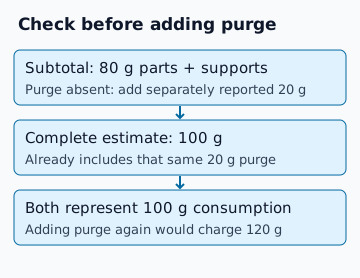
Two hypothetical reconciliations
| Reported inputs | Inclusion check | Consumption and cost at 24 CU/kg |
|---|---|---|
| 80 g parts/support + 20 g purge | Purge absent from the 80 g subtotal | 100 g; 2.40 CU |
| 100 g complete total + 20 g purge category | Purge already inside the 100 g total | 100 g; 2.40 CU, not 120 g / 2.88 CU |
These are original arithmetic examples. No particular slicer screen was reproduced for this guide. Category labels and reporting scope must be checked in the installed software and exported project. If inclusion is unknown, record that uncertainty and resolve it before treating the figure as complete.
What belongs in the consumption record?
- Model perimeters, infill and top/bottom layers.
- Supports, interfaces, brim, raft or other planned structures where used.
- Purge, prime and wipe structures according to the exact profile and tool changes.
- Additional material absent from the reported total, such as a separately budgeted loading loss, with its source stated.
Mesh volume contains none of those process decisions. The solid-model weight explanation owns geometry-to-mass estimates; it cannot guarantee job consumption. A financial failure uplift is a cost budget, not an automatic number of grams or guaranteed rerun count.
Check the slicer and profile before changing purge
Prusa documents a single smart wipe tower shared by objects, with its size related to colour changes rather than simply object size. Its current MMU documentation distinguishes configuration-derived purge settings from a custom project transition matrix. These are PrusaSlicer/MMU vendor descriptions, reviewed 10 October 2026; menu location and applicable settings depend on your installed version and profile. This guide does not assert an observed UI result.
Read the primary wipe-tower documentation and MMU purging-volume documentation. A tower preview or calculated purge volume is not evidence of reliable printing. Do not reduce purge merely to reach a cost target; the actual process requirements and supplier instructions govern it.
Different spools need separate cost bases
Hypothetical plate: 60 g from a 1,000 g spool priced at 24 CU costs 1.44 CU; 40 g from a 500 g spool priced at 20 CU costs 1.60 CU. Total is 100 g costing 3.04 CU. An unlabelled average price would hide which grams used which basis. Repeat those entries for each unchanged run and preserve the source amounts in the report.
Keep colour/material/spool scopes distinct where compatibility differs, even if prices match. The spool sufficiency tool checks one compatible scope against a weighed reel. A 100 g total across two incompatible materials cannot prove that one 100 g remainder is sufficient.
Practical reconciliation before quoting
- Slice the agreed revision using the intended machine, materials and profile.
- Record software version, source units and whether each figure is model-only, subtotal or complete consumption.
- Compare component sums with the displayed total without adding nested categories twice.
- Separate each material price basis and any explicitly unreported material.
- Use the job cost rows; leave additional grams at zero for a complete total.
For the broader workflow, estimate filament consumption, then check one compatible remaining spool. Reserve remains an editable decision separate from the entered consumption.
FAQ
Should I always add a waste percentage?
No. Complete consumption already including supports and purge needs no mandatory uplift. Add only identified material absent from that total.
Can I average different filament prices?
Retain each material weight and spool price basis and sum their costs. An unlabelled average loses the evidence for the weighted total.