
File diagnosis with owned examples
Why Are Objects Missing After Importing a 3MF?
Substantially updated 2026-10-29. First published 2026-10-07.
A 3MF can store resources without placing them, reuse a resource for several build items or put geometry outside the current view. Investigate expected inventory and placed-item identity before mesh repair. Hidden or disabled state in an authoring application is another thing to verify; it is not a universal 3MF visibility rule.
Start with the expected inventory
Keep the source revision and ask which placements the recipient expects. A named part, resource definition, top-level build item and connected shell are different concepts. A single placed item can contain nested components; splitting shells cannot reliably reconstruct that identity.
| Package control | Stored mesh resources / placements | Resolved reference |
|---|---|---|
| One placed cube | 1 / 1 | 12 triangles; 20 mm spans |
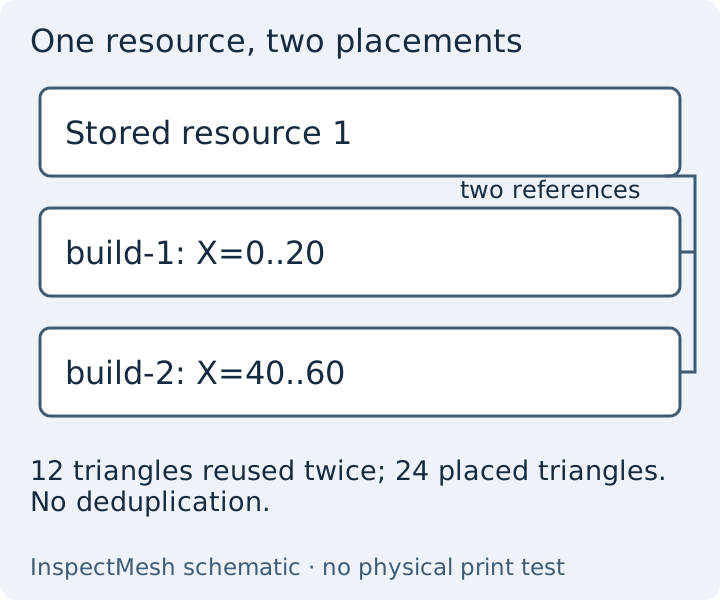
| Two placed cubes | 1 / 2 | 24 triangles; X=0..60 mm; second item X=40..60 mm |
| Unplaced-resource control | 2 / 2 | Stored count rises, but the build stays 24 triangles at X=0..60 mm |
| Declared-inch transformed control | 1 / 1 | 12 triangles; 25.4 mm spans; X=50.8..76.2 mm |
Trace the selected placement
Identify the intended item, inspect its placement and reference, check the receiver's support, then compare the actual export. A stored but unplaced resource and an unresolved reference need different responses; conversion cannot recover missing intent.
- Open the two-placement package in 3MF Viewer. Both build-1 and build-2 reference resource 1.
- Select build-2, choose Isolate selected and Frame selected. Read its X=40..60 mm bounds beside the all-build bounds.
- Choose Show all, then compare the receiver's object/plate list and its current framing, visibility and enabled state.
- Record any receiving recentering, scale or below-bed movement. A part may exist without appearing in the current view.
| Placement record | Known reference | Receiving observation |
|---|---|---|
| build-2 / source resource 1 | X=40..60, Y/Z=0..20 mm; visible when shown and isolated by its local row | External receiver untested; record app/version and actual visibility separately |
The local resolver and exact saved-byte check were rerun on 27 October 2026; see the filled evidence record. Nested components remain one top-level selection. Viewer isolation changes the preview, while converter scope remains a separate deliberate choice.
Stored but unplaced is different from unreadable
Compare the one-placement control with the unplaced-resource control. A resource absent from the build contributes no build triangles. Do not automatically promote stored resources or delete repeated placements as duplicate meshes.
A missing resource reference stops the bounded local load with a specific diagnostic; it cannot silently omit the failed item and report complete-build success. Required unsupported semantics, component cycles and cross-part references also require the original application or a supported source export. Do not assign an unreported corruption cause solely because a package failed to open.
Interpret the actual receiver state
| Observation | Interpretation to test | Next action |
|---|---|---|
| Expected item outside view | Transform, scale, camera framing or receiver movement | Compare its named interval and frame the complete scene |
| Resource stored without a build item | Not selected for this build | Ask the source author whether it should be placed |
| Required unsupported semantics | This importer cannot establish complete intended geometry | Use the original application and preserve the source |
| Geometry present but project differs | A separate property or setting was not retained | Verify property portability |
Choose another 3MF build check when the inventory is resolved. For the initial opening sequence use the 3MF opening guide. For a subsequent processing failure use slicing diagnosis. Resolved counts do not establish supported solid volume: the two disjoint cubes still leave volume unavailable under the current single-component screen.
Choose a delivery scope only after the inventory is understood. The derivative can retain placed coordinates but flattens resource/build identity. Representation source reviewed 27 October 2026: 3MF Core Specification resources, components and build sections. No external receiver or physical test is inferred from the local controls.
FAQ
Does one stored resource mean one visible part?
No. A resource can be placed more than once or remain unused. Compare expected build items and transforms with the original project.
Can conversion recover missing parts?
No. It exports the supported chosen build geometry and cannot recover missing resources, unsupported semantics or the author’s intent.