
STL geometry diagnosis
Degenerate STL Triangles: Identify and Verify Cleanup
A mathematically degenerate triangle has zero area: two positions coincide, or all three positions lie on one line. A very narrow triangle can have nonzero area and still be excluded by a workflow's numerical tolerance. Identify the reported face before removing it, keep the original and check the complete cleanup report on the saved derivative.
Repeated positions, collinearity and a narrow surface
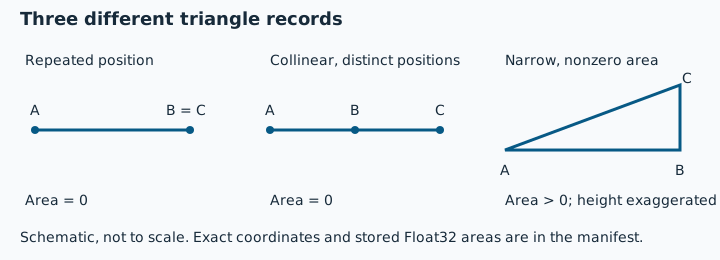
For vertices A, B and C, area is half the magnitude of (B - A) cross (C - A). A=(0,0,0), B=(1,0,0), C=(1,0,0) repeats a position; replacing C with (2,0,0) makes three distinct collinear positions. Both areas are exactly zero. C=(1,0.000001,0) instead produces an analytical area of 0.0000005 square coordinate units. STL declares no physical unit.
Download and reproduce the findings
These original controls were run on 31 October 2026 through the actual local preflight reader and topology function, and the unchanged local processor used by quality-check jobs. The workflow names matter: these are software observations, not a deployed-job run or physical print test.
| Control | Area of added or single face | Local preflight | Local processor |
|---|---|---|---|
| Cube plus repeated-position triangle | 0; 13 stored faces | 1 degenerate; 0 duplicate | 1 degenerate; 0 duplicate; 2 components |
| Cube plus collinear triangle | 0; 13 stored faces | 1 degenerate; 0 duplicate | 1 degenerate; 0 duplicate; 2 components |
| Single repeated-position triangle | 0 | 1 degenerate | 1 degenerate |
| Single collinear triangle | 0 | 1 degenerate | 1 degenerate |
| Single narrow triangle | 4.999999987376214e-7 after binary reopen | 0 degenerate; 3 open edges | 1 degenerate; excluded from edge checks |
| Existing closed cube reference | No added face; 12 stored faces | 0 degenerate; 0 duplicate | 0 degenerate; 0 duplicate |
| Existing duplicate-face cube | Repeated valid face; 13 stored faces | 0 degenerate; 1 duplicate | 0 degenerate; 1 duplicate |
In the narrow binary file, C reopens as (1, 9.999999974752427e-7, 0). The recalculated area remains positive. It is not mathematically zero merely because the processor flags it. The two cube additions lie wholly inside the original 0-20 bounds; deleting just the final zero-area face would mathematically restore the reference. The next section records what cleanup actually did, rather than assuming that outcome.
Why the workflows disagree at a numerical boundary
The checked preflight implementation counts a repeated index or an exactly zero squared cross product. The checked processor validator uses a relative rule: squared cross-product magnitude is at most 1e-12 times the square of the longest squared edge length. That is a shape-dependent numerical test, not one fixed area in mm². The single narrow control satisfies that processor rule after Float32 storage. No threshold was changed for this article.
Component counting also has a different scope: local preflight skips the zero-area face before joining components, while the processor records the detached added record as another component and reports that warning. Neither count identifies which design pieces are intentional. Read the named report, not an assumed universal InspectMesh threshold or shell count.
Actual cleanup: read every changed category
| Saved derivative | Complete change summary | Reopened result |
|---|---|---|
| Repeated-position cube, cleaned | 1 degenerate removed; 0 duplicates removed; 0 orientation corrections; no skipped reasons | 12 faces; 0-20 bounds on each axis; 1 component; valid in the processor's checks |
| Collinear cube, cleaned | 1 degenerate removed; 0 duplicates removed; 0 orientation corrections; no skipped reasons | 12 faces; 0-20 bounds on each axis; 1 component; valid in the processor's checks |
The full before/after reports, saved-file hashes and source revisions are in the processor observations. The fixture manifest records every source file, coordinate, byte length and SHA-256, while local reader observations keep the preflight and viewer-loader results separate. The generator and reproduction commands are named in those records. A repeated valid face is owned by the existing duplicate-triangle guide; its earlier cleanup experiment is not repeated here.
Choose removal, review or re-export
| Finding | Next action | Verification |
|---|---|---|
| An isolated zero-area record | Review it against the source, then consider conservative cleanup on a copy. | Compare the entire report, bounds and saved surface against the original. |
| A nonzero narrow face on a designed feature | Review source tessellation and scale before deleting it. Re-export when that better preserves the intended feature. | Inspect that feature and the surrounding surface in the receiving slicer. |
| Zero-area faces beside boundaries or overlaps | Resolve the known design boundary or Boolean in the source. | Do not accept deletion alone as reconstruction of missing geometry. |
Open a control deliberately in local STL preflight, or choose standard STL cleanup only when you intend to upload that selected file for processing. Downloading a control starts neither action and replaces no current input. After saving, inspect the exact output with the quality checker and your intended slicer. Removing degenerate faces does not prove closure, outward orientation, absence of intersections or printability.