
STL design correspondence
Mirrored STL File: Check Handedness Before Printing
Compare known asymmetric features with the original design or mating part. Reflection moves features to the opposite handed arrangement; rotation changes their pose, and reversing triangle winding changes face orientation without moving the vertices. A mirrored part can be a valid mesh and the intended left-hand design. Quality checks cannot decide which version you meant to print.
Use an asymmetric reference, not a cube
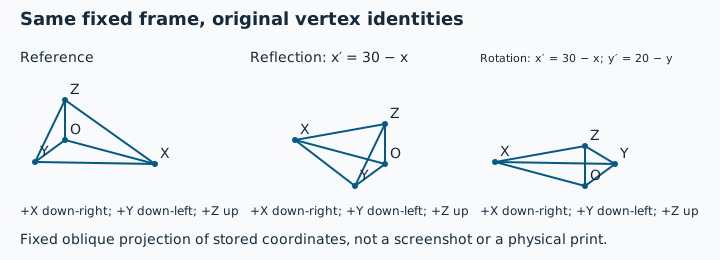
The reference tetrahedron has O=(0,0,0), X=(30,0,0), Y=(0,20,0) and Z=(0,0,10). All six edge lengths differ, so corresponding vertices can be distinguished. Outward faces are (O,Y,X), (O,X,Z), (O,Z,Y) and (X,Y,Z). The analytical signed volume is +1000 cubic coordinate units. Only an explicit millimetre interpretation makes that 1000 mm³; STL itself stores no unit.
Four files, equal spans, different questions
| Download | Construction and winding | Recalculated signed volume | Observed preflight / processor |
|---|---|---|---|
| Outward reference | Original labelled vertices and outward faces | +1000 | 4 faces; 0 open edges; no winding conflicts; absolute volume 1000 |
| Mirrored outward | x′ = 30 - x; reverse each face's vertex order | +1000 | 4 faces; 0 open edges; no winding conflicts; absolute volume 1000 |
| Rotated outward | x′ = 30 - x; y′ = 20 - y; keep face order | +1000 | 4 faces; 0 open edges; no winding conflicts; absolute volume 1000 |
| Inward reference | Keep original coordinates; reverse every face | -1000 | 4 faces; 0 open edges; no winding conflicts; absolute volume 1000 |
Every file has X bounds 0-30, Y bounds 0-20 and Z bounds 0-10. The rotation is 180 degrees around a Z-parallel line through (15,10); the reflection is across the plane X=15. Neither transform changes edge lengths. The reflection changes the handed arrangement of the labelled vertices, whereas the inward reference changes only their face order. A rotation cannot align all corresponding vertices of this reflected scalene control with the reference.
The signed volumes above were independently recalculated from the serialized binary coordinates; they are not a signed value reported by the public tool. Local preflight and the unchanged local processor were executed on 31 October 2026 and reported the absolute volume and edge results in the last column. All four processor validations passed their implemented checks. None of those checks establishes intended handedness, intended outside, assembly fit or physical print success.
Why a reflected mesh can still face outward
Reflecting coordinates reverses orientation. Reversing each face's vertex order as well preserves the outward order in the mirrored control. Its positive signed volume therefore does not establish the designer's intended side. Conversely, all faces in the inward control remain mutually consistent across shared edges; no winding conflict is reported even though the global signed volume is negative. The existing flipped-face guide owns local-patch and inward-shell diagnosis. Changing stored normals alone does not relocate a key, thread or letter to its intended side.
Compare design correspondence before choosing a transform
| Observation | Useful comparison | Next action |
|---|---|---|
| A keyed cutout is on the opposite side | Use a fixed assembly viewing direction and the same identifiable feature on the source. | Establish the intended left/right variant before deliberately reflecting geometry. |
| The model is facing the wrong direction on the bed | Check whether rotation brings all asymmetric features into correspondence. | Use the existing orientation workflow; do not reflect simply to change pose. |
| Text or a handed fastener seems reversed | Compare against an authoritative design and mating interface, not a camera view alone. | Review the actual geometry and intended viewing side. No physical fastener test was performed here. |
| Only shading or face-side appearance differs | Compare vertex positions and winding separately. | Investigate face orientation instead of moving the features. |
Preserve the original and reopen the exported bytes
- Keep the source and record the intended handed variant and a fixed coordinate/viewing frame.
- Choose reflection only when design correspondence calls for it. A left/right pair can intentionally require both variants.
- Save a separate output, reopen those exact bytes and compare the same labelled features with the source or mating-part reference.
- Check dimensions, relevant edge findings and actual sliced layers before committing material or time.
A slicer placement transform and an exported STL are different evidence. Do not assume the saved bytes contain the visible transform until reopening them. Prusa's official object manipulation documentation describes per-axis mirror controls and coordinate frames, reviewed 31 October 2026. This article did not perform a PrusaSlicer mirror/export experiment and does not present application clicks as tested instructions.
Open the controls deliberately in the local viewer or preflight. No download starts an upload or replaces your current file. For bed pose, follow the orientation guide. InspectMesh has no wrong-handedness detector in this workflow and this batch adds no mirror tool.
Download the full coordinate and transform manifest, local workflow observations and processor observations for exact hashes, matrices, source revisions, workflow names and reproduction commands. These original software controls are available for reuse; no material, strength or physical assembly test is claimed.