
Mesh topology explained
What Does Non-Manifold Geometry Mean?
Substantially updated 2026-10-15. First published 2026-09-05.
Non-manifold geometry means a surface does not join into one unambiguous neighbourhood everywhere. An edge used by more than two triangles is an easy example. A hole, two separate closed parts and surfaces that cross in space are different observations; they can also cause slicing trouble, but an edge-count result cannot identify all of them.
The three edge patterns
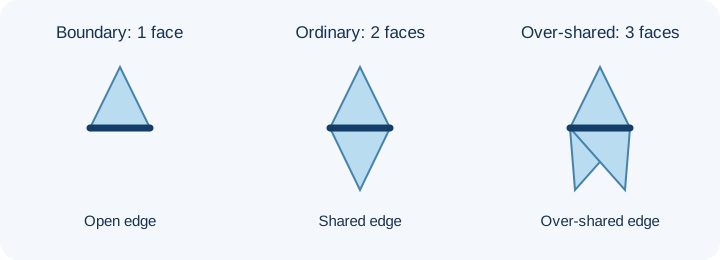
| Faces incident on an edge | Report meaning | What it cannot decide |
|---|---|---|
| One | Boundary or open edge | Whether the opening was intended |
| Two | Ordinary shared edge; direction is checked separately | Whether the complete solid is sound |
| Three or more | Over-shared edge, labelled non-manifold edge in the report | Which face should be removed |
Cases an edge count cannot settle
| Downloadable control | Implemented checker result | Additional question |
|---|---|---|
| Open cube | 10 faces, four boundary edges | Was the square face meant to be present? |
| Closed cube | 12 faces, no edge findings | Does the shape match the source? |
| Duplicate face | 13 faces, one duplicate, three over-shared edges | Is one exact face redundant? |
| Separate cubes | 24 faces, two vertex-connected components, no edge findings | Are two parts intended? |
| Point-only contact | Server vertex connectivity may count one component; edge incidence does not establish a joint | Is a physical joint intended? Inspect source CAD. |
| Crossing cubes | 24 faces, two components, no edge findings; intersection not tested | Should these solids be joined? |
Two separate closed shells can each be well formed and intentionally separate. A point touch can be an invalid joint despite no over-shared edge. Spatially crossing faces can have no shared mesh edge at all. The CGAL mesh-processing manual distinguishes mesh topology from self-intersection testing.
Read your InspectMesh result
The STL Manifold Checker matches exact stored vertex positions, excludes degenerate faces from its edge counts, and connects reported components by shared vertices. The local STL Repair part selector instead needs a complete shared edge. Neither count identifies intended material, nested shells or all vertex non-manifold cases. “Closed by edge test” means no boundary edge was found by that method; it is not a printability certificate.
What to do next
Match your actual finding to the focused correction workflow. Inspect the original model and save a separately named derivative before testing sliced layers.
FAQ
Can two closed parts be separate without an edge defect?
Yes. The separate-cube control has two vertex-connected components and no boundary or over-shared edges; whether both parts belong is a design decision.
Does a zero boundary count prove one printable solid?
No. The crossing-cube control has no boundary edges while its surfaces intersect; the edge test does not identify that crossing.