
Support-risk diagnosis
3D Print Bridge vs Overhang: Identify the Geometry First
A bridge spans open space between supported anchors. An overhang extends outward from material supported mainly on one side or by the previous layer. The same downward-facing surface can look similar in a mesh view, so confirm the generated layer paths and their anchors before choosing bridge settings or supports.
Compare the load path, not only the face angle
| Case | Geometry below the new line | What the mesh angle screen can show | What must be checked in the slicer |
|---|---|---|---|
| Bridge | Established anchors at both ends of a span | Downward-facing underside may be flagged | Bridge classification, direction, span and anchor placement |
| Overhang | Previous layer supports part of a line from one side/below | Sloped downward-facing triangles may be flagged | Layer overlap, perimeter order and need for support |
| Floating island | First extrusion starts without model below | Geometry may be connected elsewhere or a separate component | First affected layer and generated support paths |
| Supported underside | Support interface lies below the model | Same model face remains downward-facing | Contact/interface paths, gap and removal access |
InspectMesh's triangle-normal checker does not simulate bridge anchors or decide the slicer's extrusion role. A flagged downward horizontal underside can become bridge paths, supported paths or an unsupported failure depending on surrounding geometry and the profile. Use the STL Overhang Checker to reproduce the geometry screen, then apply the broad support-risk interpretation.
Compare two owned roof controls
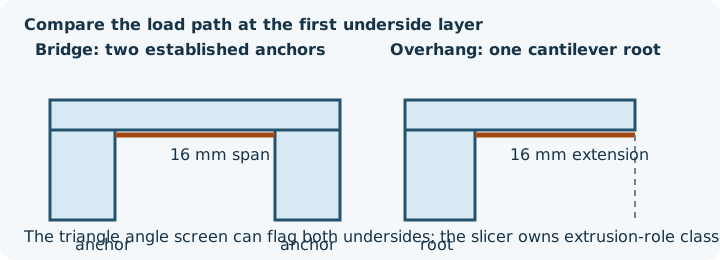
The bridge STL has two 10 × 10 × 10 mm pillars separated by a 16 mm gap and a 2 mm roof. It has 44 triangles, bounds 36 × 10 × 12 mm and one connected component. The cantilever has one 10 mm cube and the same 16 mm horizontal roof extension; it has 28 triangles, bounds 26 × 10 × 12 mm and one connected component. Both have a 160 mm² roof underside. At +Z and a strict 45° vertical-reference threshold, the current checker reports 360 mm² flagged for the bridge and 260 mm² for the cantilever because other downward base faces also belong to each closed mesh.
Retained preview-only PrusaSlicer 2.9.6 exports used a 0.4 mm nozzle, 0.45 mm extrusion width, 0.2 mm layers, two perimeters and 15% infill. Both first produced bridge-labelled paths at Z=10.2 mm. The bridge run warned about long bridging extrusions. The cantilever warned about floating bridge anchors, loose extrusions and long bridging extrusions. These are software observations, not physical-print results or printer-ready G-code.
Read the first affected layer
- Find the first underside layer.
- Trace both ends of each span and compare them with the previous layer.
- Inspect the bridge direction rather than only the top-down mesh view.
- Check whether support and interface paths replace or sit below the span.
- Step through the following layers and look for recovery or continuing loose paths.
Choose the matching next action
| Observation | Reasonable next experiment |
|---|---|
| Short bridge with clear anchors | Compare the native bridge preview/profile and a representative coupon |
| Long or poorly anchored bridge | Reorient, add a deliberate intermediate support/design feature, split or redesign |
| Gradual overhang | Compare orientation and overhang/support settings in the intended profile |
| Island beginning above empty space | Add verified support, change orientation or correct the source/placement cause |
| Critical visible underside | Compare support contact, bed-facing alternatives or a deliberate split |
There is no universal maximum bridge length, angle or cooling prescription. Material, cooling, speed, extrusion width, span and machine all matter. Check the exact slicer version and profile; Prusa's poor bridging guidance and support material documentation are primary references for the tested slicer family.