
3D print preparation guide
3D Print Overhangs and Supports: How to Check a Model Before Slicing
Substantially updated 2026-10-18. First published 2026-09-09.
An overhang result identifies downward-facing geometry under an angle convention. It does not decide whether the slicer will bridge, support or successfully print the region.
1. Understand the angle convention
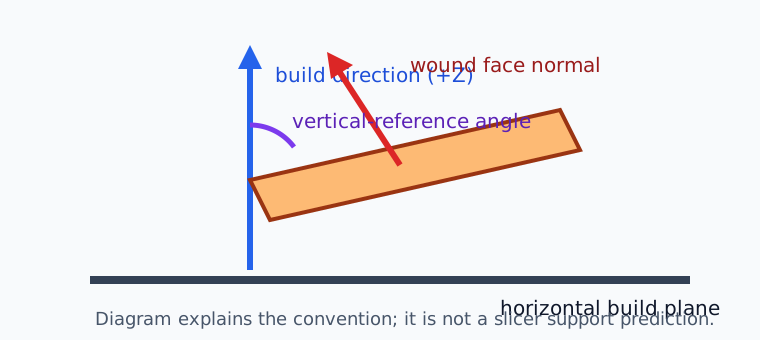
InspectMesh calculates a wound triangle normal, keeps downward-facing faces relative to the selected build direction and measures their slope from vertical. It flags a face only when the value is strictly greater than the selected threshold. A horizontal downward face is 90° by this convention. Always identify the reference because another tool may quote the complementary angle from the build plane.
2. Read the checker as a screen
| Output | What it establishes | What it does not establish |
|---|---|---|
| Build direction and threshold | The coordinate frame and strict geometry condition | A slicer support threshold with identical semantics |
| Analysed and skipped triangles | Nondegenerate faces used and degenerate faces excluded | Watertightness, islands or intended outside |
| Total and flagged area | Triangle surface area and its flagged share in the selected or defined unit | Support volume, projected footprint or bridge span |
| Highlighted faces | Where the normal condition occurs | Needs support, will fail or will have a particular finish |
STL has no authoritative unit, so its area label follows your explicit unit assumption. Supported 3MF units and placed transforms resolve to millimetres before normal and area calculation. Vertex winding controls the face direction; an STL's stored normal is not treated as authoritative.
3. Distinguish bridge, overhang and island
A bridge has established anchors across open space. An overhang grows from material on one side or below. An island begins without model material below its first extrusion. All can include downward-facing mesh triangles, so use the bridge-versus-overhang procedure and inspect the first affected layer rather than inferring the path from a mesh screenshot.
4. Choose an orientation and support strategy
Compare flagged area with bed contact, critical visible/mating faces, support removal and printer fit. The orientation planner exposes six axis-aligned candidates without calling one universally best. The native slicer still owns the support style, interface gap, bridge direction and actual toolpaths.
5. Plan support removal before slicing
Support that is easy to generate may be trapped in a chamber or reachable only through a narrow turn. Inspect the opening and intended removal direction before accepting a support-heavy orientation. Use the internal support-access workflow for through-channels, blind cavities and critical internal faces.
6. Use a representative coupon when the trade-off matters
For an unfamiliar material, finish or angle, print a small coupon with the same layer height, extrusion width, cooling and intended direction. Label the angle convention, change one setting at a time and examine underside bonding, edge curl and dimensional change. A coupon is stronger evidence than copying a generic threshold, but it still does not reproduce the full model's thermal mass, long paths or local airflow.
7. Finish in the native slicer
- Use the intended printer, material and process profile.
- Inspect actual support and interface paths, including the gap to the model.
- Find the first affected layer and compare it with the layer below.
- Check bridge classification, anchors and direction separately.
- Verify removal access and contact on critical faces.
- Save the slicer project/profile and record the chosen compromise.
FDM bridge and overhang guidance does not create a universal resin support rule. Use the documentation for the selected process, machine, material and slicer rather than transferring one angle uncritically.