
Internal support planning
Supports Inside Holes and Channels: Check Access Before Printing
Support inside a hole or channel is useful only if it can perform its job and be removed without trapping material or damaging the part. Inspect the internal cross-section, slice the actual orientation and trace a removal path before committing to the print.
Separate four different questions
- Does the internal surface need support under the chosen profile? A geometry threshold alone cannot answer this.
- Did the slicer actually generate support or bridge paths there? Inspect the first affected layers.
- Can tools or hands reach the support after printing? A narrow turn or enclosed cavity can block removal.
- Will removal damage a mating, sealing or cosmetic surface? Accessibility does not guarantee an acceptable finish.
Compare a through-channel with a narrow-access cavity
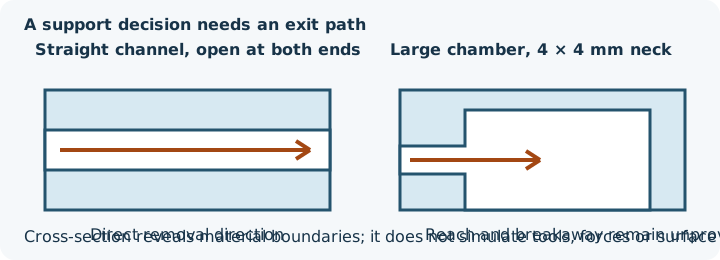
The watertight straight-channel control is 40 × 20 × 20 mm with a 40 × 8 × 8 mm passage open along source X. It has 64 triangles, one component and zero open edges. The narrow-access control is a 40 × 30 × 24 mm body with a 26 × 20 × 14 mm chamber reached through an 8 mm long, 4 × 4 mm neck. It has 284 triangles, one component and zero open edges. A watertight surface can enclose an internal void or define a through-channel; “open passage” does not mean “open mesh.”
The InspectMesh cross-section viewer can expose those openings and material boundaries. Clipping does not simulate tool reach, support breakaway force or post-processing damage. Load the control in the local STL Viewer to inspect its clipped geometry before opening the same file in the slicer.
Inspect the support path in the slicer
- Orient the model as intended.
- Slice with a recorded printer, material and profile.
- Locate the first roof/underside inside the channel.
- Confirm whether model bridge lines or support/interface lines are generated.
- Step through the channel and identify continuous support, gaps and access openings.
- Record the intended physical removal direction and smallest opening from source geometry.
In retained preview-only PrusaSlicer 2.9.6 exports, bridge support was allowed with a 45° support threshold, 0.4 mm nozzle, 0.45 mm extrusion width, 0.2 mm layers, two perimeters and 15% infill. The straight channel generated support material from Z=0.2 to 10.8 mm and interface paths from Z=4.6 to 11.8 mm. The narrow-access cavity generated support material from Z=0.2 to 16.8 mm and interface paths from Z=4.6 to 17.6 mm. The native slicer preview is authoritative for these labels. The G-code is retained as software evidence, not offered as printer-ready output, and no physical removal was tested.
Choose a geometry-level alternative
| Constraint | Geometry-level option to evaluate |
|---|---|
| Support has a straight removal path | Keep the path open and verify tool clearance and critical faces |
| Support would turn a corner or pass a narrow neck | Change orientation, enlarge a deliberate access opening, split or redesign |
| Internal roof can use controlled bridge paths | Test the intended span and profile with a representative coupon |
| Critical seal or mating face would be contacted | Move the interface, split on a safer plane or redesign the surface |
| Compatible multi-material system is available | Follow printer and material guidance for breakaway or dissolvable support |
“Support everywhere” is not a complete plan if the support cannot leave the finished part. For a deliberate split, use the split-model workflow. Resin drainage and hollowing are separate decisions covered by the hollowing guide.
Verify the final decision
Retain the source and slicer project; check the internal section; check actual support/bridge paths; verify access/removal direction; protect critical faces; and test a representative section when the full part is costly or important. A geometry control does not prove successful physical removal. Use the broad support-risk guide and bridge comparison for the preceding decisions.