
3D print preparation guide
How to Hollow an STL File and Inspect the Result
Substantially updated 2026-10-27. First published 2026-09-05.
Decide whether the job needs different slicer infill or an actual designed cavity. Changing infill leaves the source mesh different from a hollowed model with interior walls and openings. InspectMesh can help inspect a saved derivative; it does not hollow the STL for you.
Choose the process operation first
| Requirement | Work in | What to verify |
|---|---|---|
| Change ordinary FDM internal material | Intended slicer: perimeters, top/bottom and infill settings | Actual layer paths and consumption; source mesh need not become hollow |
| Create a permanent internal cavity or passage | Suitable design/mesh software, or a documented supported slicer hollowing operation | Inner surfaces, intended chambers, remaining material and openings |
| Prepare a resin hollow model | Documented printer/material/software workflow | Drainage, washing, curing and access in the intended orientations |
Preserve the source and use the exact application's documented operation. Hollowing can introduce sealed pockets, internal ceilings or intersecting walls. Estimate the material benefit in the slicer before accepting the added geometry and post-processing work. A material-saving intention does not establish structural suitability.
A designed opening is different from a missing face
A designed hole passes through material; a missing face leaves the surface unfinished. A closed tube wall can surround an open passage. An edge checker cannot decide whether that passage is the intended design or whether it provides a suitable process route.
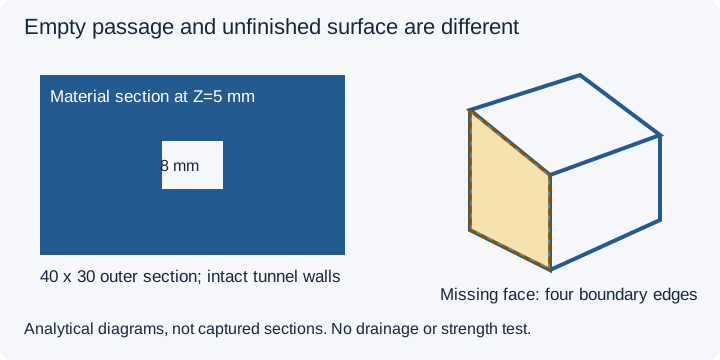
The owned 40 × 30 × 10 mm square-through-opening block has an 8 mm passage through Z. Its 32 triangles close the material boundary around that passage, giving analytical material volume 40 × 30 × 10 − 8 × 8 × 10 = 11,360 mm³. Local collection and local processor observations report zero open edges and the supported material volume. The missing-face cube instead has 10 triangles, four boundary edges and unavailable volume. See the local collection record and separate processor record.
These are generated geometry controls, not hollowed production jobs. Zero open edges does not establish that every cavity connects to an accessible opening, or prove drainage, strength or actual fluid flow.
Inspect the saved derivative through each intended region
- Identify the source revision, intended internal regions and process requirement. Resolve ambiguous source surfaces before the design operation.
- Make the change in suitable software using its documented workflow, then save a separate derivative.
- Confirm the coordinate unit and named outside dimensions. A unit mistake is different from material removal.
- Open the derivative in STL Viewer and move Inspect cross-section through every intended chamber/passage. For the square block select Cut axis Z and Cut position 50%: its 0..10 range puts the plane at Z=5 mm.
- Record the visible material boundaries, remaining wall geometry and all regions not inspected. Run the appropriate supported mesh check on the saved file.
- Review final sliced layers, internal supports and process-specific access/post-processing requirements separately.
The clipping guide explains the controls and a compact observation record. Display clipping hides geometry without extracting a contour, capping a cut or performing a hollowing operation. Use the wall-thickness owner for material-wall questions and support-access owner for removal access.
Keep resin process guidance specific
Formlabs' PreForm hollowing documentation, reviewed 27 October 2026, describes its topology-based operation and drainage planning. Follow the exact printer/material documentation for washing, curing and wall requirements. Do not transfer a product-specific setting into a universal hole diameter. A visible passage into one chamber does not establish access to another or complete post-processing.
FAQ
Can InspectMesh hollow an STL?
No. Make the design change in suitable authoring or slicer software, then inspect the saved STL derivative in InspectMesh.
Should a drainage opening create open mesh edges?
A correctly bounded passage can have intact material surfaces and no exposed edges. A missing face is an unfinished surface, not an equivalent design operation.
Does zero open edges prove a cavity drains?
No. It does not establish intended cavity connectivity, process access, complete washing/curing or physical flow.