
Calibration and fit
3D Print Hole Size Compensation: Make Holes and Pins Fit
Substantially updated 2026-10-17. First published 2026-09-15.
Calculate starting hole and pin dimensions
Measure holes and pins separately
An undersized hole and an oversized pin can produce the same failed assembly. Measure both features in the orientation in which they were printed. Use clean, cooled parts and an appropriate gauge, pin or caliper technique; forcing caliper jaws into a small rough hole can produce a misleading value. Take several measurements and record the direction because X/Y and vertical features can behave differently.
Work a compensation example
In an illustrative example, a CAD hole is 10.00 mm and three controlled prints measure 9.68, 9.72 and 9.70 mm. Their average is 9.70 mm, an observed diameter shortfall of 0.30 mm. A provisional CAD test hole of 10.30 mm is reasonable for the same printer, material, orientation and profile. This is not a universal offset: print a coupon with nearby sizes, then select the smallest hole that provides the required fit without excessive play.
Clearance is not compensation
Compensation addresses a repeatable difference between designed and produced size. Clearance is the intentional gap between mating parts. Establish machine behaviour first, then choose clearance for sliding, locating, press-fit or fastened parts. Do not add the same number blindly to every radius, pin and slot.
For a split-print socket and dowel, compare the produced socket diameter with the produced pin diameter after applying the same sign convention. In the illustrative alignment-pin example, a designed 4.30 mm socket and 4.00 mm pin have 0.30 mm nominal diametral clearance, while hypothetical readings of 4.18 mm and 4.08 mm leave only 0.10 mm. The selected clearance and the two production errors remain separate inputs.
Choose CAD edit, slicer offset or whole-part scale
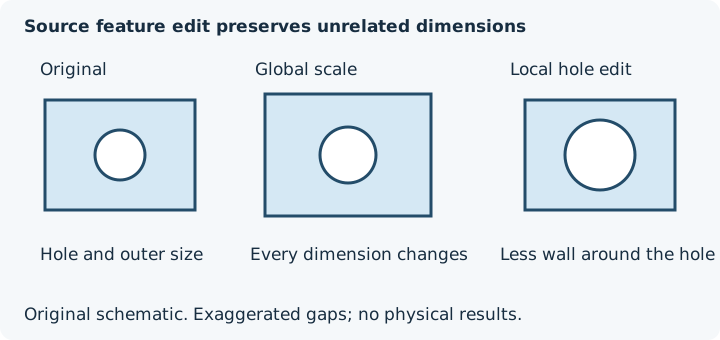
A parametric CAD edit changes the selected source feature and is visible in the exported geometry. A slicer offset changes the documented contours during toolpath generation and may not appear in an unchanged exported STL. A whole-part scale changes outer spans, hole diameters, centre spacing and walls together. Use whole-part scale only when representative axis measurements support that different task.
For a slicer control, check current official documentation for your exact version, sign, contour scope and radius-versus-diameter convention. This guide deliberately gives no numerical slicer-offset conversion. Record the source revision and active profile so a baked CAD correction is not applied again in the slicer. Keep eH = mean produced hole - designed hole, then model hole = target produced hole - eH in the worksheet. The empirical offset does not transfer automatically across sizes or orientations.
Validate before changing the production model
- Use the intended nozzle, material, layer height, orientation and profile.
- Print a compact coupon containing the relevant hole and pin range.
- Measure after cooling and test the real mating component where possible.
- Update a copy of the CAD model and inspect the exported dimensions.
- Repeat after hardware, material or orientation changes.
If roundness is poor or values vary around the circumference, investigate belts, motion, cooling, extrusion and seam placement before applying a scalar offset.
Localise the restriction before correcting size
Record bore-axis orientation and the height/direction of each reading. Use the orientation diagnosis for directional restrictions and the base-flare guide for bed-facing interference. Their procedures should precede a scalar hole offset.
Prefer model-level evidence over one measurement
Test several nominal sizes around the real feature and include the intended pin, bearing or fastener. A consistent offset across sizes supports compensation; a changing or irregular error suggests geometry, motion, extrusion or cooling needs attention. Measure pins as well, since reducing a pin may preserve more wall around a hole in some designs.
For holes near the first layer, check for bed compression before editing the entire bore. For safety-critical or load-bearing assemblies, follow the hardware and material design guidance and validate the finished joint physically.
Check surrounding geometry
Thin walls around a hole can deform or slice poorly. Inspect them with the STL or 3MF Wall Thickness Checker, then verify line count and orientation in the slicer.
Practical cautions
- Drilling or reaming may be better for precision holes.
- Horizontal and vertical holes can need different compensation.
- Flow calibration makes extrusion more consistent but does not remove the need for clearance.
- Record successful values by material and profile.
Plan a test fit before altering your CAD model
Keep compensation local and reversible
Apply the tested change to a named model revision or parametric feature rather than silently rescaling the whole part. Note the printer, profile, axis and coupon result in the design. When sending the model elsewhere, provide the uncompensated source or explain the baked-in correction; another machine may need a different value. Re-check wall thickness around enlarged holes and edge distance around fasteners before export.
FAQ
Why are my 3D-printed holes too small?
Perimeter width, curved paths, cooling, shrinkage and feature orientation can make holes undersized.
Should I enlarge every hole by the same amount?
Test the relevant size range first. Small holes often behave differently from large openings and the desired fit matters.