
Split-print assembly planning
Alignment Pins for Split 3D Prints: Plan and Test the Joint
Alignment pins help locate printed sections during assembly. Choose the pin, socket and insertion direction together, allow for measured printing error and test a small joint before modifying the full model. A pin that aligns a seam does not by itself establish the strength of the finished joint.
Choose what the connector needs to do
| Feature | Alignment purpose | Assembly direction and dimensional check | Choose another design when |
|---|---|---|---|
| Loose dowel | A separate part locates sockets on both printed sections. | Insert along the socket axes; check dowel diameter, both socket diameters, depth, end clearance and total length. | A separate piece can be lost, cannot be inserted, or the surrounding material is insufficient. |
| Integrated peg | Added geometry on one section locates a socket on the other. | Insert along the peg axis; check peg root, diameter, engagement and receiving depth. | The root creates a fragile feature, print orientation is poor, or a replaceable locator is preferred. |
| Keyed feature | Asymmetry constrains orientation as well as lateral position. | Follow the one intended insertion direction; check every width, corner, lead-in and engagement surface. | The key creates thin walls, traps support or needs force around a corner. |
One symmetric round locator can permit rotation. Multiple locators can resist rotation, but inconsistent spacing or position can make them bind. There is no universal pin count. Treat screws and inserts and snap fits as separate hardware or flexure decisions.
Keep clearance and print error separate
This fully worked example is illustrative and was not physically tested. The selected design clearance is one input; printer, material, orientation and profile error are another. A 0.30 mm diametral clearance is not a universal recommendation.
| Quantity | Arithmetic | Result |
|---|---|---|
| Designed diametral clearance | 4.30 mm socket - 4.00 mm pin | 0.30 mm |
| Ideal concentric radial clearance | 0.30 mm ÷ 2 | 0.15 mm per side |
| Hypothetical measured pin | Designed 4.00 mm, read as 4.08 mm | 4.08 mm |
| Hypothetical measured socket | Designed 4.30 mm, read as 4.18 mm | 4.18 mm |
| Resulting measured diametral clearance | 4.18 mm - 4.08 mm | 0.10 mm, not the nominal 0.30 mm |
Record hole error as produced hole minus designed hole and apply the same sign convention used by the tolerance worksheet. Use the hole-size compensation guide for the full measurement and correction method.
Check engagement, depth and surrounding material
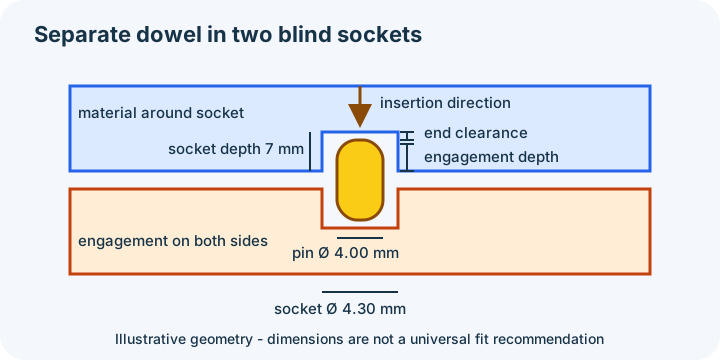
A loose pin's length spans engagement on both sides plus any intended seam gap. A blind socket can bottom out before the seam closes, so leave deliberate end clearance. Chamfers and lead-ins can ease initial alignment, but they consume geometry and do not correct a wrong diameter, depth or centre position.
For ideal concentric geometry, a 10 mm outside boss around a 4.30 mm socket leaves (10 - 4.30) ÷ 2 = 2.85 mm of radial material. That is geometry arithmetic, not a strength recommendation. Also inspect edge distance, nearby cavities, layer direction and the root of any integrated peg. Mesh dimensions alone do not establish load capacity.
Design a small coupon before the full part
The owned example uses two 20 × 20 × 10 coordinate-unit blocks, each with a 4.30-diameter, 7-deep blind socket, plus a separate 4.00-diameter, 12-long dowel. Under its illustrative plan, a 0.2 seam gap and 5.9 engagement on each side leave 1.1 end clearance in each socket. These are demonstration dimensions, not calibrated production recommendations.
- Download block A STL
- Download block B STL
- Download the separate dowel STL
- Download the dimensions and source manifest
Download the editable geometry generator and software observations. The circular features are polygonal mesh approximations: 24 segments around each socket and 32 around the dowel. The stated diameters describe their design circles; the facets do not form mathematically smooth cylinders.
The established repository script generates the exact meshes from these dimensions. Software verification reopened every STL as one closed component with the stated bounds. No native CAD project or physical fit is claimed.
- Slice and print with the intended material, orientation and profile.
- Measure pin diameter, socket diameter and locator centre positions.
- Dry-fit without forcing; record insertion, rotation and seam closure.
- Adjust the feature responsible for the observed error, not whole-part scale by default.
- Repeat the coupon before applying the change to the full model.
Add connectors in the right application
InspectMesh's splitter makes a supported X, Y or Z planar division and caps the outputs. It does not generate pins, sockets or connector clearance unless those features already exist in the input. Add them in source CAD or a tool which explicitly supports connector design.
Prusa's official Cut tool guide, reviewed 17 October 2026, distinguishes plug, separate dowel and snap connectors and documents their controls. That is a separate PrusaSlicer workflow, not feature parity or evidence that InspectMesh can create those connectors.
Verify the final pair and assembly
- Reopen both final meshes and confirm common scale, unit assumption and revision.
- Check connector diameter, clearance, depth, engagement, centre position and seam location.
- Check each piece in its intended orientation with real support and brim allowance.
- Review the native sliced paths around every socket, peg and seam.
- Dry-fit and assess the actual assembly separately from the geometry screen.
A print-in-place joint is a different task from joining separately printed sections; use the fit and clearance guidance for that distinction. For the seam decision, return to the complete split workflow. Use the STL Viewer to inspect each export before slicing.