
3MF format guide
3MF Units Explained: Millimetres, Inches and Scale
Substantially updated 2026-10-26. First published 2026-09-05.
A 3MF model declares the unit used for its coordinates; the Core specification uses millimetres when that attribute is omitted. Read that unit together with the supported component and build-item transforms. A declared unit gives context, but the receiving application's resolved physical size still needs checking.
Unit, coordinates and transforms are different inputs
| Action | What changes |
|---|---|
| Change only the unit declaration | Physical interpretation of the same numbers |
| Convert coordinates consistently with a unit change | Numeric representation can change while physical size is preserved |
| Apply a scale transform | Resolved placed geometry changes size |
| Change display units | The displayed representation, if implemented as display conversion |
A resource definition is not a placed item. Components and build items can transform reusable geometry. Measure the intended resolved scope rather than treating one stored mesh as the whole build. InspectMesh supports a bounded subset; the specification's permitted units and extensions are not a promise that every package can be processed.
Follow one control from package to physical size
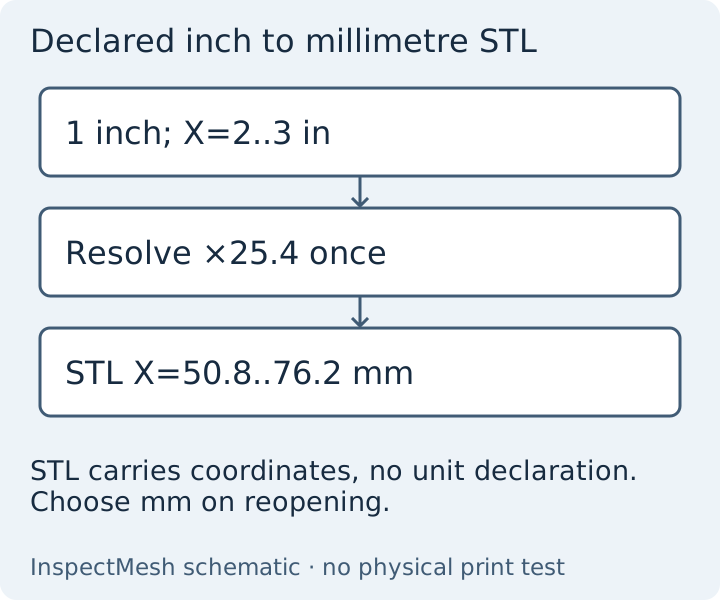
The declared-inch control contains a one-coordinate-unit cube translated two source units on X. Unit resolution gives 25.4 mm spans and X bounds 50.8 to 76.2 mm, with 12 triangles. The converted STL reopens with nearby Float32 coordinates in the same millimetre convention. STL has no unit declaration; choose millimetres in the receiver.
The existing reopened conversion evidence checks the derivative rather than asserting a receiving-slicer result. The source control and software observation are retained. Do not scale the resource and its placement separately as two unit corrections.
Investigate a disagreement before correcting it
- Keep the source and record its declared or default unit. Compare the same package revision in both applications.
- Check intended items versus full build bounds. Two unchanged 20 mm cubes can span 60 mm because of their placements.
- Compare supported component/build transforms, any later scaling, display conversion and application versions.
- Use derivative troubleshooting when source/export/reopened/receiver measurements differ. Record translation separately from span.
- If the actual project needs resizing, follow the external-application scaling procedure and save a new project. Reopen it and inspect the intended slicing profile.
Core specification version 1.4.0, unit and transform definitions reviewed 26 October 2026. A valid unit declaration does not establish design intent, physical fit or support for application-specific settings.