
3D printing file formats
3MF vs STL: What Must Survive the Handoff?
Substantially updated 2026-10-27. First published 2026-09-05.
Use STL when the recipient needs triangle geometry and can interpret its unit convention correctly. Use a supported 3MF when declared units, placed-item structure or other required properties must travel with the model. The useful choice is the one the actual receiving path preserves.
Start with the required information
List what the recipient must retain before converting. A single-colour knob for a proven mesh importer may need only a surface and an agreed unit. A build containing repeated placements needs its intended inventory and coordinate locations checked. Neither requirement is answered by the age of the file format.
One preservation comparison
| Required information | STL | 3MF |
|---|---|---|
| Surface geometry | Triangular facets | Supported mesh resources and components; no detail is created by repackaging |
| Physical unit | No standard unit declaration; agree the interpretation | Declared unit in core model data; verify resolved physical size |
| Coordinate location | Vertex coordinates can encode off-origin placements | Geometry plus separate supported build transforms |
| Resource / build identity | No named build-item hierarchy | Resources can be reused by distinct placed items |
| Appearance | No standard material or texture representation | Core base-material display colour and other defined properties/extensions, subject to support |
| Project preparation state | No slicer profile or supports record | May contain application-specific project data; exact receiving path must be checked |
| Native design history | Not retained | Mesh delivery does not recreate a native CAD feature timeline |
A format's capability is different from an application's implementation. A successful import does not prove every property was read or used. Keep source CAD for design revisions and the original project when future preparation changes matter.
Two placed cubes: coordinates survive without editable placements
The owned two-cube 3MF stores one 20 mm mesh resource and places it at X=0 and X=40 mm. The resolved build spans X=0..60 mm, including a 20 mm empty gap. It contains 24 triangles, not one joined solid.
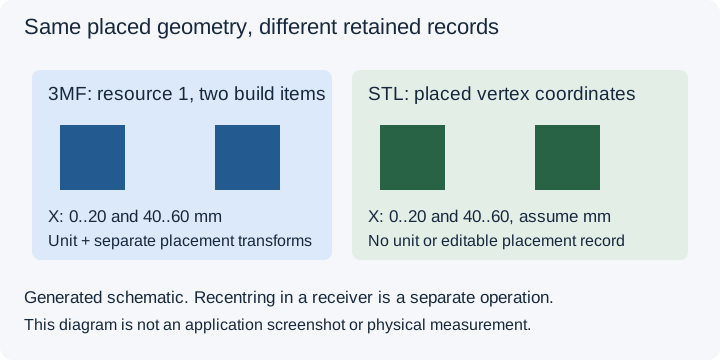
The application-internal saved-byte check on 27 October 2026 produced an entire-build STL with 24 triangles at those positions and a selected-second-placement STL with 12 triangles at X=40..60 mm. Both are interpreted as millimetres. See the exact-output record and hashes.
Exporting separate STL files does not necessarily discard their coordinate locations. This converter preserves resolved placement by default. STL lacks the separate resource identity, build transform and unit declaration, while the receiver may independently recenter, merge or rescale the geometry. Record that import operation rather than attributing every later movement to the export.
Accept the actual application path
- Agree required surfaces, units, placement and properties for a named revision.
- Choose supported export scope deliberately; viewer isolation does not choose converter scope.
- Reopen the exact saved file and compare the named references.
- Import into the receiver with recorded options and mark each property preserved, changed, missing or untested.
Use the receiving-file record to retain those observations. This internal example verifies the derivative's chosen triangles and coordinates, not external slicer compatibility, profile preservation or physical printability.
Choose the next task
For entire-build versus selected-item delivery, use the scope guide. For colours, materials and project settings, verify those properties separately. Convert a supported 3MF only when the recipient's geometry requirement is clear; an STL-to-3MF package cannot restore lost textures or design intent.
Representation basis reviewed 27 October 2026: 3MF Core Specification 1.4.0 and the Library of Congress STL description.
FAQ
Is 3MF always better than STL?
No. Choose by the information the actual receiver preserves. STL can satisfy a geometry-only handoff with explicit units; 3MF can carry declared units and supported build structure.
Does exporting STL lose all placement?
No. Vertex coordinates can retain resolved placement, but STL has no separate editable build transforms or unit declaration. Check what the receiver does on import.
Does converting STL to 3MF add detail?
No. Repackaging cannot restore source curves, textures, material assignments or native design history absent from the STL.