
3D printing file guide
What Is the Best File Format for Your 3D Print Handoff?
Substantially updated 2026-10-27. First published 2026-09-09.
Choose the file type for the next operation and the information that must survive. Keep native CAD for controlled design work, use a suitable exchange file when another CAD system needs the geometry, and use a supported mesh or model package for print preparation. Confirm the receiver's requirements before exporting.
What must the recipient do?
Ask which application, version and import operation will receive the file, then name the required revision and information. An unknown recipient is a reason to ask, rather than default to an extension. Keep the editable source independently of any delivery copy.
Decision matrix by handoff stage
| Task | Candidate delivery | Information to verify / specialist guide |
|---|---|---|
| Continue engineering edits | Native CAD or suitable STEP exchange | Agreed authority, bodies, units and editable information. Compare engineering exchange with mesh delivery. |
| Receive geometry alone | STL when accepted | Unit convention, critical geometry and coordinate location. Compare STL with 3MF. |
| Keep declared units and placed-item structure | Supported model 3MF | Resource/build identity, resolved transforms and required semantics. Choose whole-build or single-item scope. |
| Receive a textured polygon model | OBJ plus referenced MTL and images | Bundle completeness and actual receiver appearance. Inspect the OBJ companion-file demonstration. |
| Resume a particular slicer project | Original project in a compatible application | Profiles, plates and assignments in that exact workflow. Verify project properties. |
These are starting points, not universal importer promises. InspectMesh's mesh tools accept STL and supported 3MF; they do not parse OBJ or STEP. A model or CAD file is not universally printer-executable. Prepare and review the actual job in the intended slicer and printer workflow.
What a successful open does not establish
Visible geometry does not prove correct units, all intended placements, working appearance references or retained project settings. Counts and outer dimensions alone cannot establish identical surfaces. Agree named reference dimensions and features before export; reopen the saved derivative and inspect what the receiving operation actually did.
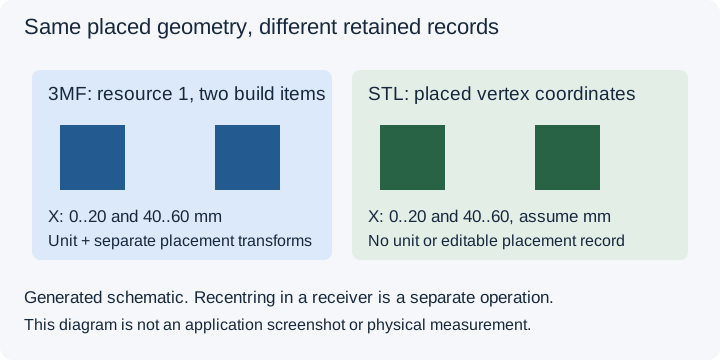
Filled receiving check: two placed cubes
The original two-placed-cubes package declares millimetres and places one 20 mm resource twice. On 27 October 2026 the existing local resolver and converter serializer ran in Vitest, then the exact saved STL bytes were reopened by InspectMesh's STL reader. This is an application-internal derivative check, with no external slicer or physical test.
| Recorded field | Observed evidence |
|---|---|
| Source / derivatives | two-placed-cubes.3mf; entire-build.stl; second-placement.stl. Exact hashes, method/source revision and verification reports are in the filled JSON record. |
| Producing / receiving method | InspectMesh supported 3MF resolver → scoped binary STL writer → local STL reader; preserve resolved placement; no translation. |
| Required reference | Two placements; 20 mm cube spans; second X interval 40..60 mm. STL interpreted as millimetres. |
| Observation | Entire build: 24 triangles, X=0..60 mm. Second placement: 12 triangles, X=40..60 mm. Both have Y/Z=0..20 mm. Existing exact-triangle verification passes under its Float32 storage basis. |
| Unresolved / next action | External appearance and project profiles: untested. Ask the actual receiver to record its import options, units and placement before accepting that handoff. |
Download the filled record and source hashes, entire-build STL or second-placement STL. Both STL downloads use a millimetre convention; STL itself declares no unit.
Blank receiving-file acceptance record
Record one specific handoff. Blank cells remain unanswered and do not indicate success. Use preserved, changed, missing or untested for each required property and attach the evidence.
| Field | Recorded evidence |
|---|---|
| Source and derivative | |
| Producing application | |
| Receiving application | |
| Required information | |
| Expected reference | |
| Observation | |
| Import options | |
| Unresolved limitation | |
| Next action |
Download the blank CSV. For packaging a full collection, use the separate seller release manifest. This record establishes only the named receiving check, not approval of a complete job.
Inspect the supported placed inventory and named coordinate references in 3MF Viewer before choosing a derivative. Viewing stays local; optional issue analysis has a separate explicit upload action.
Technical sources
Reviewed 27 October 2026: 3MF specifications, the Library of Congress STL description and NIST's historical STEP introduction. They describe representation roles; application compatibility still requires its own test.
FAQ
Which format should I send to an unknown recipient?
Ask which application and input it accepts and what information must survive. Confirm the required units, geometry, structure or project state before exporting.
Can a model file run a printer?
Not universally. Geometry exchange and slicer projects have different roles from a printer job; prepare and review the intended machine-specific output.