
3D file format guide
STL vs OBJ: Does the Complete Bundle Arrive?
Substantially updated 2026-10-27. First published 2026-09-05.
Choose STL for a geometry-only mesh handoff when the receiver accepts it. Choose OBJ when required appearance or grouping data is supported by that receiving workflow, and send every referenced companion file. Seeing the geometry open does not prove that its material or texture references worked.
What must survive?
| Concern | STL | OBJ handoff |
|---|---|---|
| Surface representation | Triangle facets | This example uses polygon faces; the receiver may triangulate them |
| Physical size | Agreed coordinate-unit convention | Also needs an agreed unit convention |
| Appearance | No standard texture/material data | Material assignment can refer to MTL and image assets |
| Delivery inventory | One geometry file | All referenced files with stable relative paths |
Richer appearance does not automatically improve geometric detail or printed colour. Ask whether the intended application uses the relevant properties and how they map to the actual manufacturing process.
Bundle anatomy: one original block
Download the complete owned OBJ bundle. It contains sample.obj, sample.mtl, textures/checker.png and README.md. The closed block spans X=0..20, Y=0..10 and Z=0..5 under the agreed millimetre convention. It has eight coordinate vertices and six outward-wound quad faces. The original blue/yellow checker image is 16 × 16 pixels. The assets are CC0-1.0 mathematical/appearance controls, not a captured import or printed specimen.
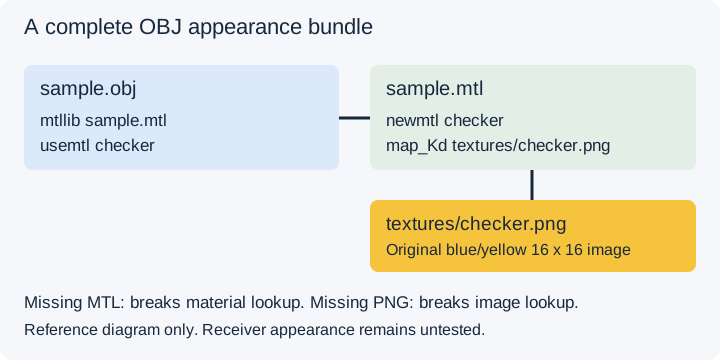
In sample.obj, mtllib sample.mtl names the library and
usemtl checker assigns its material to faces. The MTL defines
newmtl checker and map_Kd textures/checker.png. Each
face references valid vertex and texture-coordinate indices. Renaming only the
image breaks the relative image reference; omitting the MTL breaks the
material-library lookup earlier.
Focused asset validation checks the inventory, safe reference paths, indices, UVs, closed outward edge incidence and analytical 1,000 mm³ material volume. These structural checks do not establish a particular application's rendered appearance. The asset inventory and hashes identify the distributed files.
Complete versus missing companion experiment
- Extract the complete ZIP into a fresh directory, retaining textures/checker.png at that relative path.
- In an application that supports OBJ/MTL/image textures, record its name, version and import options. Open sample.obj and inspect bounds, face assignments and texture orientation.
- Make a separate working copy and remove the texture. Record whether geometry loads, a warning appears, or appearance falls back.
- Restore the texture and remove the MTL instead. Record this different missing-reference stage without overwriting the complete bundle.
- Reopen the intact original and compare the actual required appearance.
Receiver appearance remains untested for this control. The experiment is for the reader to execute; the diagram is not a software observation. An illustrative swatch cannot prove import support or manufactured colour.
Record acceptance and choose the next stage
Record source/derivative revision, required grouping or appearance, unit convention, expected dimension, observed state and unresolved limitations in the receiving-file acceptance record. Leave unrun checks untested. Sending only sample.obj may still deliver geometry while failing the appearance requirement.
InspectMesh's tools in this workflow accept STL and supported 3MF, not OBJ, MTL, STEP or ZIP uploads. For a geometry-only derivative, export STL or supported 3MF from suitable authoring software, then inspect the saved mesh. An STL-to-3MF conversion cannot recover discarded textures. Preserve the appearance source when the job needs it.
Reviewed 27 October 2026 against the Library of Congress Wavefront OBJ description and companion-material references. The bundle's own README documents reproduction and the agreed coordinate convention.
FAQ
Does OBJ guarantee better print quality?
No. Geometry, export approximation and the print process determine the result. Appearance references add information without guaranteeing a more accurate surface or manufactured colour.
Does InspectMesh open OBJ files?
No. Use suitable authoring or receiving software for OBJ. InspectMesh tools here accept STL and supported 3MF geometry.
Can an OBJ open without its texture?
An application may still display geometry while appearance is missing or replaced. Test the exact receiver and record the actual result.