
3D printing cost guide
How to Calculate 3D Printing Cost
Substantially updated 2026-10-29. First published 2026-09-05.
Build production cost from complete sliced consumption, machine time and the work actually included in the order. Keep shared setup separate from per-run handling and per-part finishing. Solid geometry mass is not complete sliced consumption: infill, supports and purge change the job. Production cost comes before profit margin and customer selling fees.
Set the job scope
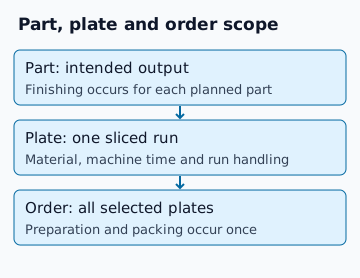
Record agreed model revision, material, profile and planned quantity. The existing fictional five-identical-part job uses Plate A: three parts, 90 g, four hours; Plate B: two parts, 70 g, three hours. Run each once. These are hypothetical sliced inputs, not observed production or accepted quantities. Re-slice when arrangement or quantity changes.
Work through the five-part baseline
| Component | Calculation | Currency units |
|---|---|---|
| Material | 160 / 1,000 × 24 | 3.84 |
| Energy | 0.12 kW × 7 h × 0.30 /kWh | 0.252 |
| Machine allocation, excluding energy | 7 h × 2 /h | 14 |
| Shared preparation | 20 / 60 h × 18 /h | 6 |
| Handling each run | 2 × 10 / 60 h × 18 /h | 6 |
| Finishing each planned part | 5 × 5 / 60 h × 18 /h | 7.50 |
| Packaging, once per order | Entered amount | 1.60 |
| Production order cost K | Sum; shipping, extra waste, tax and failure uplift = 0 | 39.192 |
| Average per identical planned part | 39.192 / 5 | 7.8384 |
Load this fictional job in Several plates / one job. The allocation guide retains its plate-level record. Material cost is complete grams / matching spool grams × spool price; energy is assumed average kW × hours × tariff. Keep full precision until display.
Enter your own rates and included costs
State whether your machine rate already includes electricity or routine labour. Do not add those components twice. Use an observed average power input when available; 120 W in the example is an assumption, not a measured recommendation. Job mode suppresses separate energy when you mark it included in machine rates.
Use consumption inclusion for support and purge reconciliation, and the active-work record for order/run/part scope. The example's 65 active minutes are distinct from seven unattended machine hours. A currency choice labels values without exchanging rates.
Handle uncertainty once
The current calculator's failure allowance is an entered percentage budget uplift on its defined subtotal. It is not a measured success probability. Keep any expected-retry model separate and name the costs it covers. Do not add a second allowance when the entered rate or imported total already includes it.
Simple mode applies the uplift to all entered direct and overhead production costs; job mode applies it to all selected production costs including order work. A hypothetical 10% uplift changes K to 43.1112. That is a different scenario from the zero-uplift baseline, not an extra amount to add after importing K.
Pass the reviewed cost to pricing
Preserve this production record. Use the price calculator for margin, markup, fees and minimum charge, then create a customer quotation after the scope is agreed. Planned quantities do not establish delivered outcomes or a schedule.
Retained primary context: Prusa costing methodology and Prusa price calculator, previously reviewed 10 October 2026. Historical rates are not current recommendations; the arithmetic above is an independent fictional example.