
STL repair guide
How to Fix Holes in an STL File
Substantially updated 2026-10-14. First published 2026-09-05.
A hole in an STL surface is an exposed triangle boundary, but a visible opening can also be an intentional passage. Check the boundary and the design before adding faces. InspectMesh can report open edges; its repair tool does not invent a missing surface.
Compare a known open and closed surface
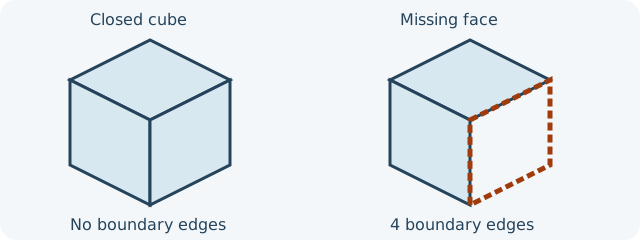
Download the open-face cube and closed cube. Both use 20-unit sides, assumed to be millimetres here because STL stores no unit. The closed control has 12 triangles, zero boundary edges and screened volume of 8,000 mm³. Deleting one square face removes two triangles: the open control has 10 triangles and four boundary edges; its volume is unavailable, not zero. Run both through the watertight checker before interpreting your own file.
An open mouth on a thick-walled vessel can still have a closed material boundary: its inner and outer walls meet at a rim. A single uncapped sheet has exposed edges. Neither appearance alone tells you whether to cap the mouth. Compare the source design, nearby surfaces and intended channel before editing. If a designed channel is present in the source but fills in sliced layers, use the closed-channel slicer comparison rather than patching an opening.
Choose a repair from the intended surface
| Finding | Next action |
|---|---|
| A simple planar face is accidentally absent | Patch a copy in a mesh editor if the plane and boundary are unambiguous; preserve the original. |
| A curved, threaded or mating face is missing | Rebuild from source CAD or use reference geometry for a manual reconstruction. A flat automatic cap can alter function. |
| A long seam or several nearby boundary loops appear | Check whether two borders need welding or a designed feature is missing. Do not cap each loop until the source shape is understood. |
| The opening is a designed channel or vessel mouth | Keep it. Check whether the material walls form the intended closed boundary and inspect its sliced layers. |
| Separate fragments exist elsewhere | Review them in STL Repair. Removing existing triangles does not fill the open cube's two missing triangles. |
Verify the saved copy, then the slices
- Reopen the edited STL, not just the mesh-editor viewport. Compare the patched region, local silhouette, dimensions and face orientation with the original.
- Run the same boundary and broader preflight checks. Zero open edges confirms closure under that method, not the correct shape, absence of intersections or physical suitability.
- Inspect the affected layers in your selected slicer for missing or unexpected perimeters and a changed channel. Save the original and edited exports separately.
If the intended surface cannot be inferred, return to the design source. A visually closed or watertight mesh can still slice incorrectly or fail as a physical part.
FAQ
Does removing a floating fragment fill a surface hole?
No. It discards selected existing triangles; it does not reconstruct missing faces or close an open boundary.
Can a vessel have an open mouth and still be a closed material surface?
Yes. A thick wall whose inner and outer surfaces meet around a rim may have no exposed mesh boundary; an uncapped single sheet differs.