
3D model measurement guide
How to Measure a 3D Model Before 3D Printing
Substantially updated 2026-10-26. First published 2026-09-10.
Choose the measurement that answers your question. Overall bounds describe the occupied envelope; two selected mesh points describe a distance between those locations. Neither identifies an exact CAD hole centre or proves the dimensions of a printed part.
| Measurement | What it answers |
|---|---|
| Global axis-aligned bounds | How far the current orientation spans X, Y and Z; not a named feature size |
| Two selected mesh points | Direct distance between those surface locations and their axis differences |
| CAD dimension | The intended analytic diameter, constraint or centre spacing |
| Physical measurement | The produced part under the measuring method and conditions used |
Rotation changes an envelope without stretching a part
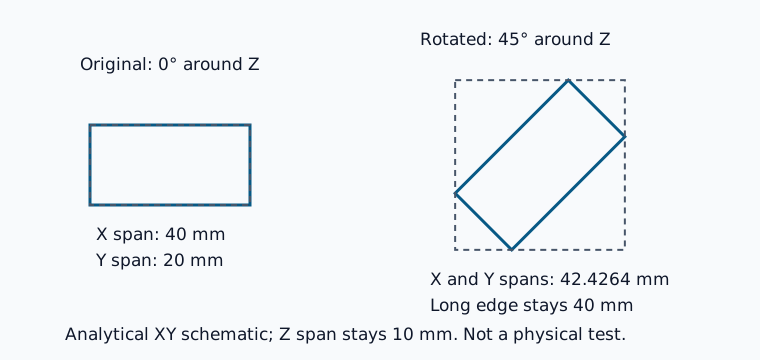
The 40 × 20 × 10 mm control has a 40 mm long edge. Rotating it 45° around Z gives an expected global axis-aligned envelope of about 42.43 × 42.43 × 10 mm. Each planar span is (40 + 20) / √2. The longer envelope does not mean the part stretched. Compare the same orientation and coordinate system when two applications disagree.
Follow one measurement sequence
- Confirm unit and transform state. STL needs a supported assumption from a known dimension; a 3MF needs its unit and placed-item context. Record scale or rotation already applied.
- Read bounds in STL Dimensions or 3MF Dimensions. Compare the intended object versus the full arrangement.
- For approximate visible-feature checks, open STL Viewer or 3MF Viewer, activate Measure distance and pick two visible surface points. Read direct distance and axis differences.
- Compare the source CAD requirements. A mounting-hole centre distance, datum or exact cylinder needs its analytic definition rather than two surface picks.
- Record unresolved features and the next measurement method. A nominal bed comparison still needs actual slicer placement, supports, brim and exclusion checks.
Know what a mesh pick cannot establish
A faceted circle may not have vertices at opposite extrema. Viewing angle, selected facets and tessellation deviation affect a picked distance. Repeat the selection or inspect a section when useful, but do not relabel it as an analytic centre or a calibrated physical dimension.
For example, a 118 × 78 × 28 mm envelope fails a 120 × 80 × 25 mm requirement on height in that orientation. Even if another orientation fits, it says nothing about a required 64 mm hole-centre spacing. Keep those two decisions separate.
Pass physical questions to a physical record
Use the source design for nominal dimensions and the fit worksheet or axis worksheet for comparable produced-part readings and exclusions. State the instrument, method and conditions. A file check cannot certify the resulting assembly.