
CAD export and mesh interpretation
STL Resolution: Chord Height and Angular Tolerance
Substantially updated 2026-10-26. First published 2026-10-08.
Choose source tessellation settings from the curve you need to approximate, then inspect the actual exported facets. Chord deviation, angular constraints and triangle count describe mesh geometry; none certifies a printed dimension.
What each setting means
Chord height/deviation is a length between the source curve and its straight approximation. Angular tolerance limits a change of direction. Other constraints, such as minimum facet width, can alter the result. A total triangle count does not specify where detail is distributed. Keep the exporter's units and parameter meanings explicit.
A circular cross-section gives a checkable example
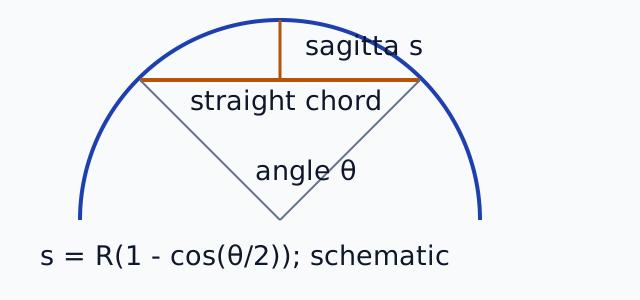
For a circle of radius R, replacing an arc with a straight chord creates a maximum inward gap, the sagitta s. If the arc spans angle θ, s = R(1 - cos(θ/2)). For N equal segments around a circle, θ = 2π/N and s = R(1 - cos(π/N)). This is a two-dimensional mathematical example, not the complete rule of a CAD surface mesher.
| Radius | Segments around circle | Angle per segment | Maximum sagitta |
|---|---|---|---|
| 10 mm | 24 | 15° | 0.08555 mm |
| 10 mm | 72 | 5° | 0.00952 mm |
The same angle on a larger radius creates a larger absolute gap. To aim for s ≤ 0.01 mm on this 10 mm circle, N must be at least π / arccos(1 - 0.01/10), approximately 70.24; round up to 71 equal segments. A 72-segment example meets that idealized cross-section condition. It does not establish a 0.01 mm tolerance for an arbitrary three-dimensional export or a printed part.
Inspect the generated curve pair
| Generated construction | Triangles | Binary bytes | Reopened X / Y / Z | Analytical circle gap |
|---|---|---|---|---|
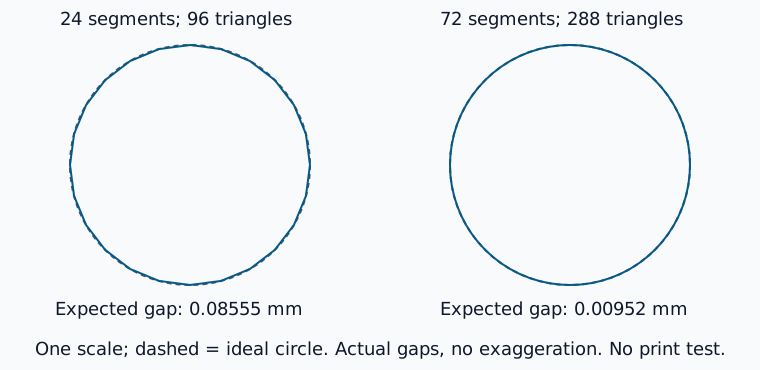
| 24 segments; cap fans and side quads | 96 | 4,884 | 20 × 20 × 20 mm | About 0.08555 mm |
| 72 segments; same construction | 288 | 14,484 | 20 × 20 × 20 mm | About 0.00952 mm |
These polygon controls reach the same outer X and Y bounds because both include the axis-extreme vertices. Between those vertices, their flat facets depart from the circle by different amounts. A matching bounding box cannot verify curve accuracy.
- Download the 24-segment control and the 72-segment control. Their designed circumradius is 10 mm and height is 20 mm; a vertex lies on +X.
- Open each in STL Viewer, assume millimetres and look down Z. Compare the silhouette at the same scale. Cross-section display can help inspect the intermediate facets; mesh point picks do not recover an analytic cylinder.
- Review the actual serialized/reopened observations. Independent edge-incidence, winding, bounds and count checks ran locally. Sagitta remains an ideal-circle calculation, not a measured exporter setting or physical result.
- When exporting your own CAD, retain its radius, exact settings and application version separately. These files were generated mathematically, not by Fusion or Onshape.
Why the settings remain separate
Chord deviation controls geometric departure; angular tolerance controls direction change and can force finer segmentation even where an absolute gap looks small. Exporters may also impose edge-length, minimum-facet or other meshing constraints. Units and exact parameter meanings must come from the particular exporter. Do not enter degrees into a field that expects radians or a length into an angle field.
The current Onshape export documentation lists separate custom STL chordal tolerance, angular deviation and minimum facet width. Autodesk's mesh export help describes surface deviation and refinement controls. Reviewed 26 October 2026; installed CAD builds were not run. Check the labels and units in your exact version.
Stop when the required source approximation cannot be verified
No universal chord tolerance or angular setting suits every shape. Return to the analytic source when an interface depends on a cylinder or datum that the mesh cannot establish. Count interpretation explains complexity; revision comparison separates finite surface samples from named-feature checks. Later simplification acts on triangles and does not inherit the original CAD tessellation condition.