
STL optimisation guide
How to Reduce STL Triangle Count
Substantially updated 2026-10-26. First published 2026-09-06.
Simplify an STL only when fewer triangles solve a real handling problem and the resulting surface still meets your requirements. Generate a separate candidate from the original, reopen it and review critical features and mesh findings before choosing it.
Start with a named constraint and feature
There is no starting percentage that protects every model. Use the least geometry change that addresses the receiving constraint, compare the exact saved candidate and keep the original when the required feature cannot be verified. A preset is an input to an experiment, not an acceptance rule.
If the issue is text storage rather than triangles, choose binary encoding without intentional triangle removal. Method selection also includes source re-export and retaining the original.
Owned raised-ridge coupon: a reproducible comparison
Download the original 24-triangle coupon, the 75% target output and the 50% target output. The original has a 40 × 20 × 10 mm block plus a separate touching 16 × 0.6 × 0.5 mm ridge. This deliberately simple two-shell control is not a validated printable solid.
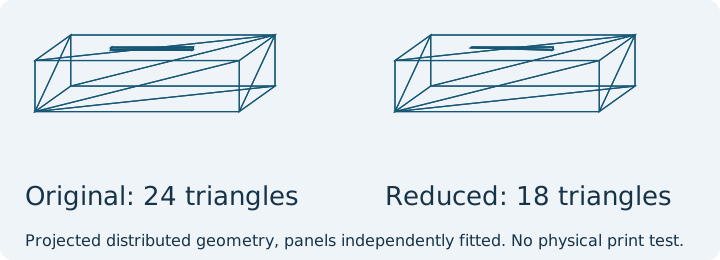
| Output | Triangles / bounds | Completed findings |
|---|---|---|
| Original | 24; 40 × 20 × 10.5 mm | Two shells; zero boundary/over-shared edges |
| 75% target | 18; same bounds | Two shells; zero boundary/over-shared edges |
| 50% target | 16; same bounds | Two exact duplicate triangles and one over-shared edge |
Reproduced in the repository software on 11 October 2026: meshoptimizer 1.2.0, target percentage, relative error 0.01 and LockBorder, then binary export, re-import and collection topology checks. The target is a request, not a promised final count. These observations do not establish that the 75% copy preserves every local detail or that any physical print succeeds.
The meshoptimizer project documents mesh simplification and error/constraint trade-offs; version 1.2 documentation reviewed 11 October 2026. This fixture illustrates why reduction percentage alone is not quality evidence. Simplify a copy locally only when the resulting model meets your own named feature checks.
Running the actual finite comparison on the original and 75% coupon in their original frame, mm on both sides and 0.1 mm tolerance gives 5,000 samples per direction: maximum sampled distance about 0.23290 mm, mean about 0.000512 mm, and 25 of 10,000 samples above tolerance. The largest observed sample is not a whole-surface maximum. A small mean can conceal a meaningful change on a narrow ridge.
The 75% candidate is an observed experiment, not an approval. Inspect the ridge close-up and compare the exact downloaded output in the surface comparison tool. Original coordinates, both millimetre assumptions and tolerance belong in the record. A low global mean does not establish local feature preservation.
Why a requested triangle target can remain unmet
The installed meshoptimizer 1.2.0 simplifier takes a target index count, not a removed-vertex count. InspectMesh computes requested triangles as floor(original triangles × kept percentage / 100), with a minimum of one, and passes three times that count as indices. The owned ridge starts with 24 triangles: 75% requests 18 and produces 18; 50% requests 12 and produces 16. Relative error 0.01 and LockBorder are unchanged.
| State | Interpretation and next step |
|---|---|
| Actual count above requested | The method stopped within its constraints; inspect actual geometry. Count alone cannot diagnose your source. |
| Invalid or unsupported source | No successful candidate. Correct the source or use a suitable authoring application. |
| Cancelled or processing failure | No completed result from this attempt; retry deliberately with the original. |
The version-specific JavaScript contract describes error and topology limits. A relative error flag is an algorithm setting, not a measured physical tolerance or a guaranteed surface bound. Do not disable protections merely to obtain the percentage.
Named small features need their own review
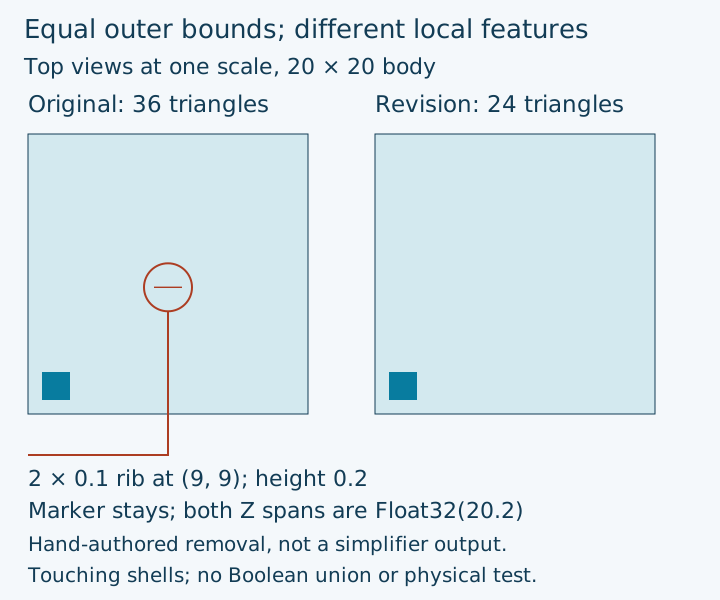
The original narrow-rib control has a 20-coordinate cube, a 2 × 2 × 0.2 marker at (1, 1, 20) and a 2 × 0.1 × 0.2 rib at (9, 9, 20). The diagnostic revision deliberately removes that rib: 36 versus 24 triangles, with the same outer bounds. The marker keeps the maximum height. These touching shells are not a Boolean union or a physical print control; the revision is hand-authored, not a reduction result.
| Feature | Review beyond the outer box |
|---|---|
| Hole or mating face | Compare source CAD diameter and contact plane; inspect the relevant section. |
| Rib or lettering | Inspect close-up geometry and relevant slicer layers; area sampling may miss it. |
| Silhouette | Rotate the shared-frame preview; look for flattened curvature. |
Generate gentler alternatives independently from the original, compare the selected candidate, and retain source CAD when a required feature remains unresolved. A low global mean does not approve a local feature.
Smaller bytes with increased mesh findings
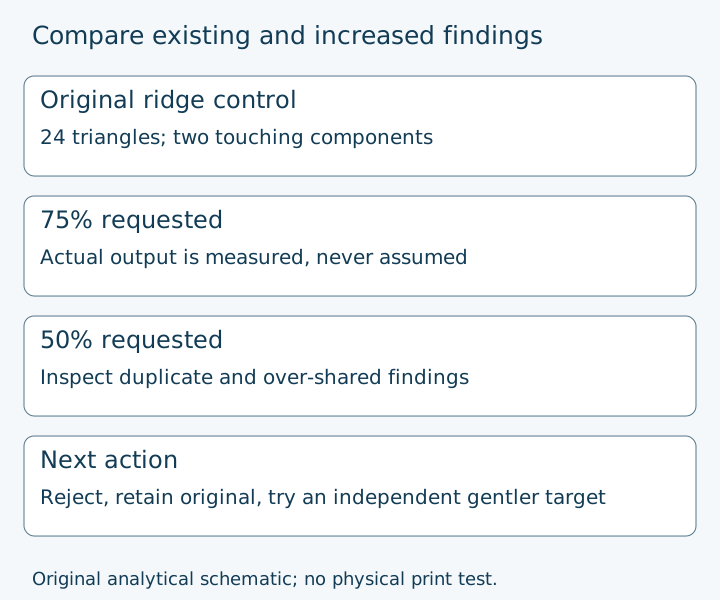
The reproduced 50% ridge output has 16 triangles and 884 bytes, versus 24 and 1,284 bytes in the original, but introduces two duplicate triangles and one over-shared edge. Reject it for the intended print workflow. The reducer retains it for diagnostic review and requires an explicit acknowledgement before a diagnostic download. The original already has two touching shells: that existing ambiguity is distinct from the new findings.
- Keep the original and reject a candidate with unexplained new findings.
- Try a gentler independent target and recheck the same supported topology method.
- Return to source CAD if connectivity or required detail cannot be preserved.
- Use the repair owner for a separate repair workflow; no silent cleanup occurs during simplification.
Identical finding counts do not prove identical defect locations. Self intersections and physical print success remain unchecked.
Record the candidate decision
| Record | Question |
|---|---|
| Receiving constraint | What practical problem did this candidate solve? |
| Candidate identity | Are these the exact bytes reopened and compared? |
| Requested / actual count | What was requested and what was produced? |
| Critical feature | Which named surface or opening must survive? |
| Findings before / after | What is new, retained, unmeasured or unsupported? |
| Comparison settings | Units, coordinate frame, tolerance and samples |
| Receiving application | Did this derivative open and retain relevant layers? |
| Decision | Use for the recorded stage, keep original or return to source |