
STL format guide
ASCII vs Binary STL: What Is the Difference?
Substantially updated 2026-10-31. First published 2026-09-05.
Choose binary STL when the recipient accepts it and you want compact triangle records. Choose ASCII when a particular workflow requires readable text. Neither choice repairs the surface, and binary export can round decimal coordinates to Float32 values.
Choose an encoding for the recipient
| Decision | ASCII | Binary |
|---|---|---|
| Readability | Readable decimal text, useful for small-file debugging | Fixed-size numeric records, not human-readable text |
| Record storage | Size depends on digits, spacing and labels | 50 bytes per triangle plus header/count |
| Coordinate representation | Decimal values may already be rounded | IEEE 754 Float32 coordinates can round those decimals |
| Mesh changes | Encoding does not itself choose a simplification | Binary encoding does not intentionally remove triangle records |
| Receiving compatibility | Use when explicitly required | Use when supported and compact storage matters |
If the requirement is fewer triangles rather than fewer stored bytes, use the method-selection guide. Do not confuse a different storage representation with a repaired or simplified surface.
Identify and validate the file structure
ASCII uses tokens such as solid, facet, vertex and endsolid. Standard binary starts with an 80-byte header and a four-byte count. A header beginning with solid does not prove ASCII: validate record length or parse the complete text facets. A truncated record is a parsing problem. Successful structure parsing does not establish closed, correctly wound or printable geometry.
If the record is incomplete, check incomplete STL records against controlled missing-byte and count-mismatch files. That investigation separates failed input from a complete file whose surface has a hole.
Understand bytes and coordinate representation
Standard binary bytes = 84 + 50 × triangle count. A 12-triangle cube uses 684 bytes. At 100,000 triangles it is 5,000,084 bytes, about 4.77 MiB. ASCII has no fixed bytes-per-triangle formula. Those are storage calculations, not predictions of slicing time or surface detail.
Does converting ASCII STL to binary lose coordinate precision?
It can round a decimal coordinate that is not exactly representable in IEEE 754 Float32. It does not intentionally remove triangles, close a hole or restore source CAD accuracy. ASCII can also contain rounded or inaccurate decimals; more digits do not establish physical accuracy.
| Decimal input | Encoded and reopened Float32 | Absolute difference |
|---|---|---|
| 20 | 20 | 0 |
| 0.1 | 0.10000000149011612 | 1.4901161138336505e-9 |
| 20.1 | 20.100000381469727 | 3.8146972514141453e-7 |
| 1000000.1 | 1000000.125 | 0.025000000023283064 |
Representation experiment reproduced 11 October 2026 with little-endian Python struct Float32 packing and unpacking; download the numerical evidence. The decimal-offset cube also runs through the actual STL serializer/reopen checks. Differences are coordinate-unit values, not a universal acceptable printing tolerance. Large offsets make Float32 spacing coarser; changing units or translating a source is a separate deliberate operation.
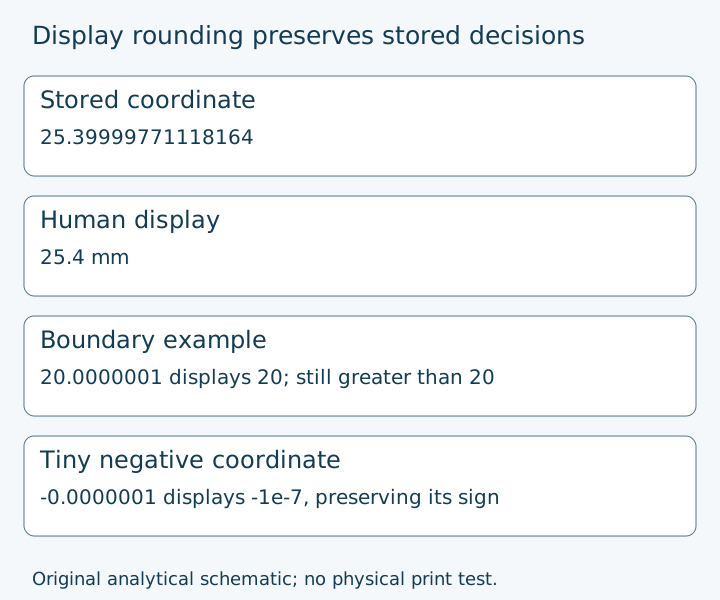
25.39999771118164 displays as 25.4 mm. A tiny negative value retains its sign; a value of 20.0000001 still exceeds a 20 boundary even when its display rounds to 20. Screen and copy values are presentation; JSON coordinates and verification decisions retain stored numerical precision. Three displayed decimals do not imply 0.001 mm measurement accuracy.
The Library of Congress binary STL description documents the record structure; Math.fround documentation explains single-precision conversion. Reviewed 11 October 2026. Review an encoding candidate against its original bytes and reopened geometry, then check a known coordinate in the receiving application.
Verify the encoded derivative
- Preserve the source and record the receiving requirement and unit assumption.
- Generate a separate binary candidate in the local reducer without intentional triangle removal.
- Reopen the exact output bytes. Compare intended triangle records under Float32 storage, important dimensions and supported topology findings. Count alone does not establish equality.
- Open that same derivative in the receiver and inspect critical features/layers. Keep the source if compatibility or a feature remains unresolved.
The detailed Float32 experiment above owns representation precision. Triangle-count interpretation owns complexity, while candidate review owns actual mesh simplification.