
STL input diagnosis
Truncated STL File: Check Missing Bytes and Records
Preserve the received STL unchanged. If a complete known control opens but your file does not, compare its byte length and reported parsing error before attempting mesh repair. Missing bytes are an input-structure problem; a structurally complete file with a hole is a different case. Obtain a complete download or fresh source export rather than inventing the missing geometry.
Check the standard binary structure
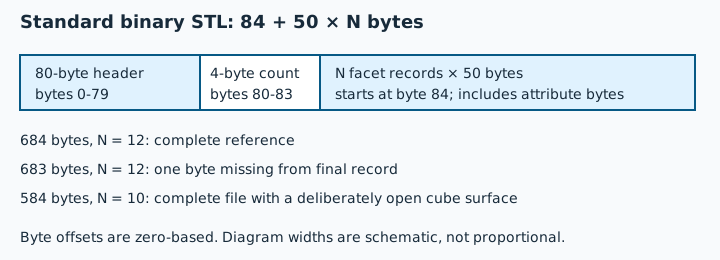
Standard, unextended binary STL has an 80-byte header, a four-byte little-endian triangle count and 50 bytes per facet. Expected bytes are 84 + 50 × N. A 12-face reference therefore occupies 684 bytes. This is standard-format arithmetic, not a universal corruption verdict for every producer-specific extension. A mismatch does not by itself establish whether the count, payload or an extension convention is responsible.
Controlled downloads and actual outcomes
The malformed downloads below are deliberate diagnostic files, not printable models. They are linked directly rather than offered as one-click gallery inputs. Checks ran locally on 31 October 2026 using actual InspectMesh functions. No file was sent to a deployed processing endpoint.
| Download | Declared faces / bytes | Local preflight | Local processor |
|---|---|---|---|
| Complete cube reference | 12 / 684 | Accepted; 12 faces, 0 open edges | Accepted; 12 faces, 0 open edges |
| Diagnostic: last byte missing | 12 / 683 | Rejected; no surface check | Rejected: invalid binary STL |
| Diagnostic: last full record missing | 12 / 634 | Rejected; no surface check | Rejected: invalid binary STL |
| Diagnostic: count 13, unchanged payload | 13 / 684 | Rejected; no surface check | Rejected: invalid binary STL |
| Existing open-face cube | 10 / 584 | Accepted; 10 faces, 4 open edges, unavailable volume | Accepted; 10 faces, 4 open edges, unavailable volume |
| Complete binary cube with solid-prefixed header | 12 / 684 | Accepted; 12 faces | Accepted; 12 faces |
The 683-byte control has all coordinate bytes but is missing the final
attribute byte. The 634-byte control has only 11 complete facet records. The
count-mismatch control instead retains the full reference payload while
declaring 13. Blindly treating all three as one repairable hole would hide
distinct input failures. The word solid at the start of a header
alone does not prove ASCII encoding.
A hole in the mesh is not a missing byte
The existing 584-byte open cube correctly declares ten facets. Parsing succeeds and the subsequent topology check finds four open edges around its missing square face. The incomplete 683-byte file is rejected before those checks. Adding padding to make a file parse cannot reconstruct the author's intended surface, and changing a declared count can conceal missing records. Preserve the input and investigate its source instead.
Different readers can stop at different stages
| Control | Component reader | Viewer loader |
|---|---|---|
| 683-byte binary cube | Rejected | Returned 12 triangles; it did not require the final attribute byte |
| 634-byte cube or count-13 mismatch | Rejected | Threw “Offset is outside the bounds of the DataView” |
| Complete one-facet ASCII control | Accepted; 1 face | Returned 1 triangle |
| Diagnostic: ASCII cut during its final vertex | Rejected | Returned empty geometry; the viewer's separate nonempty check rejects it |
Preflight rejected the three malformed binary controls and the cut-off ASCII with “We could not read that STL file. Choose a valid ASCII or binary STL file.” The strict component reader reported “Malformed or truncated STL. Binary declared counts must match its complete byte length.” The processor reported “Invalid binary STL. The file is incomplete or malformed.” for the binary cases and “Invalid ASCII STL. The file is incomplete or malformed.” for the cut-off text. Accepted ASCII input subsequently had three open edges in preflight and processor checks; one facet is not a closed solid.
These observations name readStl → inspectMesh,
parsePartStl and Three.js STLLoader 0.185.1. The
loader experiment is a unit-level read, not a full viewer screenshot or proof
of surface validity. The component-reader experiment did not run component
analysis. Full messages, source revisions, observation method and SHA-256 for
each file are in the
local observations
and
processor observations. The
construction manifest
records the exact byte mutations and complete reference hashes.
Recover the source rather than hide the failure
Check a replacement with local STL preflight. Select the file deliberately: processing stays in your browser. If parsing fails, return to the source download or export; if it succeeds, review the reported dimensions, unit assumption and topology findings. A successful read alone does not establish a complete or printable model.
| Evidence | Next action | What it establishes |
|---|---|---|
| Trusted sender provides an expected size/hash | Download again and compare those values with the replacement. | A matching SHA-256 establishes equality with that reference, not that the reference is good geometry. |
| No complete source or trustworthy reference | Ask the author for a fresh export and preserve the original received file. | A successful replacement still needs surface, dimension and unit checks. |
| Known control also fails | Check the application's supported format, file limit and browser/rendering failure. | An application failure is not proof that your mesh is damaged. |
| Replacement parses but has open edges | Investigate the boundary in the source design. | Mesh reconstruction is now a separate, informed decision. |
Use the opening diagnosis for general file/application triage, and ASCII versus binary STL for encoding and coordinate representation. Only after a replacement parses should you choose an appropriate mesh repair method and inspect its actual slicer layers. Renaming an HTML error page to .stl, adding zero bytes or running cleanup cannot recover missing original design data.
The Library of Congress binary STL description documents the standard record layout. Reviewed 31 October 2026. The numerical controls and named software observations above are original InspectMesh evidence; they are not physical printing tests.