
Slicer layer diagnosis
Floating Regions in a Slicer
Substantially updated 2026-10-18. First published 2026-10-15.
A floating-region warning concerns the layer path and what lies below it. It does not prove that the STL contains a disconnected fragment. Move to the first affected layer in your slicer preview, then compare that extrusion with the preceding layer and the intended model. An integral overhang may need support or a different orientation; a detached component may instead need a deliberate keep-or-remove decision.
Three controls that separate those decisions
| Downloadable STL | Known geometry | Decision it tests |
|---|---|---|
| Integral overhang | One closed component, 20 triangles; an arm starts at Z=10 mm and extends 20 mm beyond the base. | Support or orientation, while keeping the connected design. |
| Cube and detached tetrahedron | Two closed components, 16 triangles total. | Inspect whether the separate small object is unwanted. |
| Two intended cubes | Two closed components, 24 triangles total. | Do not delete a part merely because it is separate. |
What the slicer actually produced
The integral-overhang STL was sliced in PrusaSlicer 2.9.6 with its 200 × 200 mm default bed, centred at X/Y=100 mm, a 0.4 mm nozzle, 0.45 mm extrusion width, 0.2 mm first and subsequent layers, two perimeters and 15% infill. With supports off, the CLI reported “Floating bridge anchors, Loose extrusions, Long bridging extrusions” and suggested supports. At Z=5.2 mm its G-code has no support-material extrusion moves. Enabling support material and automatic generation produced 20 such moves on that layer. These are software paths, not a printed-part test.
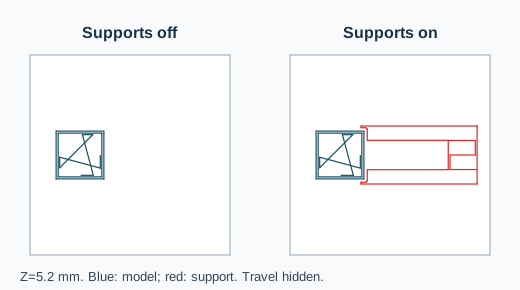
Recheck the support-off G-code against the support-on G-code in a compatible viewer. Settings and the exact input are retained with the files. A different profile can choose different paths.
Choose the correction from the first affected layer
- If the region joins the model above the build plate, inspect the layer below it. Try a reviewed orientation or support setting, then re-slice and compare the same layer. The overhang guide covers the broader support decision.
- If an entire object is separated in the source mesh, use STL Repair's local piece review. Keep all parts by default; remove only a confirmed fragment. That operation does not generate supports.
- If the separate object is intentional, keep it and check its placement, bed contact and toolpaths independently. A mesh component count cannot infer design intent.
- If an expected region is absent in layers, use slice-failure triage to distinguish geometry, placement and profile causes.
If extrusion spans between established anchors, review it as a bridge; if it grows outward from one side, review it as an overhang. The dedicated comparison shows how to distinguish them in the first affected layer.
Start with STL Print Preflight for source geometry, then finish in the target slicer's layer preview. This example uses STL coordinates as millimetres; STL does not declare a unit. The experiment shows support-path changes for one profile and says nothing about adhesion, strength or a successful physical print.
Source reviewed 14 October 2026: Prusa's support material documentation describes automatic support generation and support modes.
FAQ
Does a floating-region warning mean the STL has a detached mesh piece?
No. A continuous overhang can start above empty space; inspect the first affected layer and the source component count separately.
Will Keep largest part add support paths?
No. It selects source triangles for a separate STL download; support paths are a slicer-profile decision.