
STL orientation guide
How to Lay an STL Flat on the Print Bed
To lay an STL flat, choose the face that should contact the bed and rotate that face onto the build plane. Then verify that the model's lowest point is at the bed, the contact region is intentional and the new orientation does not create a worse support, fit or strength problem. “Flat” describes placement; it does not automatically mean “best orientation.”
First decide what “flat” should mean
| User observation | What it may mean | First check |
|---|---|---|
| Model imports on its side | Source axes differ from intended build axes | Identify the intended base face |
| One corner touches but a broad face appears tilted | Rotation is not aligned to that face | Use a face-alignment operation in the target slicer |
| Model looks flat but sits above/below the bed | Placement/origin differs from orientation | Inspect minimum Z and the slicer's drop-to-bed result |
| Largest face is on the bed but critical holes/supports worsen | The easiest base is not the best print choice | Compare at least one alternative orientation |
| Curved model has no obvious flat face | No single planar face defines a stable base | Use source CAD, a designed base, supports or a different orientation |
Rotating and moving are separate operations. A shifted cube can have the correct orientation while its source coordinates still put minimum Z below or above the build plane. See the shifted-cube placement control for the difference between source position and final slicer placement.
Use a known tilted control
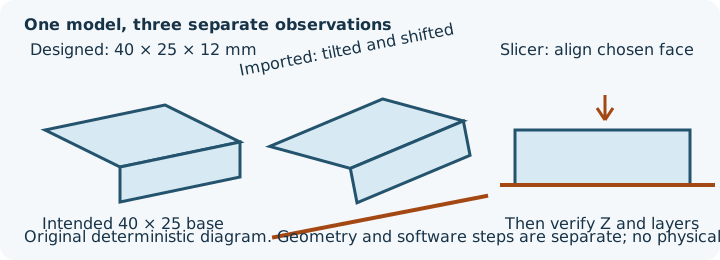
- Designed geometry: a 40 × 25 × 12 mm asymmetric block with the 40 × 25 mm source Z=0 face as its intended base and a 4 mm chamfer marking the source +X/+Z edge.
- Imported observation: the supplied STL applies source rotations X=20°, Y=-15°, Z=10° and translation (8, -4, 3). Its measured bounds are approximately X=-0.420..46.050, Y=-8.549..25.460 and Z=3..31.469 coordinate units, so its minimum Z is 3 rather than zero.
- Slicer operation: PrusaSlicer 2.9.6's documented Place on Face operation aligns the selected plane with the bed. The final bed placement and all resulting layers still need review.
The official Prusa Place on Face documentation was checked on 18 October 2026. Other slicers may name or implement the action differently. InspectMesh's orientation planner compares six axis-aligned candidates; it does not change or export the model.
Compare the base face with the actual decision
The largest flat face is a candidate base, not an automatic recommendation. A large contact estimate may improve stability but can put a cosmetic face on the bed, change a bore's build direction, increase overhangs elsewhere or align a loaded feature poorly across layers. Use the full orientation workflow and distinguish bridges from overhangs before choosing only by contact.
Verify after placing on the face
- Confirm physical scale from a known dimension; STL does not declare units.
- Select the intended planar face in the target slicer and use its documented face-alignment operation.
- Confirm minimum Z/bed placement and the resulting X/Y/Z envelope.
- Inspect contact, brims/supports, overhangs, bridges and critical visible or mating faces.
- Slice and inspect the first layer and first unsupported feature.
- Save the slicer project/profile so the chosen rotation is reproducible.
When a face-alignment tool is not enough
Curved surfaces, tiny facets and noisy scanned meshes may not offer one useful plane. A multi-part assembly can also need a shared coordinate system, and the intended base may not exist as a planar mesh face. Correct the source CAD or use a measured manual rotation and verify the sliced layers. Do not flatten geometry or delete triangles merely to make a face selectable.
Next, compare the six candidates in the orientation planner, apply the broader orientation decision, and confirm printer fit and allowances.