
Hidden mesh geometry
How to Find Internal Faces in an STL
A shaded outside view cannot show every triangle inside an STL. An internal sheet left by a failed Boolean may be unwanted, while the inside wall of a hollow part can be essential. Inspect a cross-section and compare the original design before deleting anything; a zero open-edge count alone cannot tell those cases apart.
Outside view versus inside cross-section
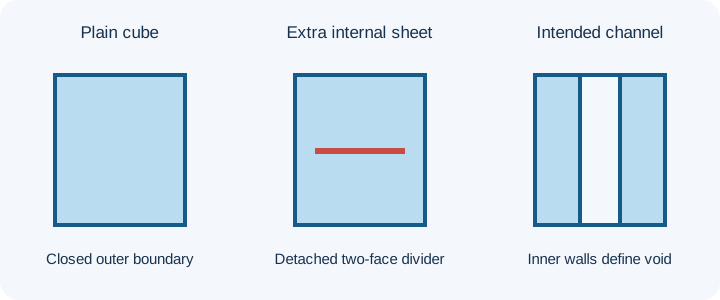
Download the plain cube, cube with an internal sheet and closed through-channel. The first two have the same 20-unit outside silhouette. The divider consists of two triangles with corners at X/Y 4 and 16, Z 10, wholly inside the outer cube. The channel control is a separate 20 × 20 × 10 box with a 6 × 6 passage, so compare the internal role, not identical outer height.
In the local viewer, choose Inspect cross-section, select Z and move the cut gradually through the middle; also inspect an X cut through the passage. The viewer guide explains the controls. Clipping hides geometry for inspection; it does not edit faces or prove valid topology.
What the mesh report does and does not say
| Known control | Actual processor report | Remaining question |
|---|---|---|
| Plain cube | 12 triangles; zero open and over-shared edges; one vertex-component; no winding conflict; 8,000 cubic-unit closed-control volume | Does its exterior match the design? |
| Cube plus isolated sheet | 14 triangles; four boundary edges on the sheet; zero over-shared; two vertex-components; no winding conflict. Enclosed volume is unavailable for this open internal sheet. | Was this divider accidental? The report does not label it “unwanted”. |
| Through-channel | 32 triangles; zero open and over-shared edges; one vertex-component; no winding conflict; 3,640 cubic-unit closed-control volume | Must this passage stay clear in the chosen slicer? |
The server compares stored coordinates exactly and connects reported components through shared vertices. An isolated inner sheet can be located by visual cross-section and component selection; spatial intersection with another surface is not tested by the edge counts. Cavity walls are a material boundary and can be correct while invisible from outside.
Decide whether the surface belongs
Compare source CAD, the intended cavity or assembly, and sliced layers. For an accidental divider after a failed union, correct the Boolean at the source or make a reviewed manual edit. For an intended passage, keep the inner walls; the filled-channel guide shows a separately tested slicer case. Deleting a sheet without checking the remaining mesh can create a hole or the wrong solid. “Keep largest part” can remove this isolated control's smaller piece, but size alone cannot decide whether any real inner shell is expendable.
Verify the revised STL
Keep source and edited files separately. Reopen the edited bytes, compare the cross-section, component count, open and over-shared edges, and the first affected slicer layers. Do not select faces solely because they have small area. Stop when the original design cannot tell you whether an internal surface is an error or a required cavity boundary.
FAQ
Can Keep largest part identify an unwanted hidden face?
No. It ranks edge-connected pieces by area and leaves the design decision to you. A small cavity wall can be essential.
Can a clean exterior silhouette prove there is no hidden sheet?
No. The plain cube and the cube with a detached internal square have the same outside bounds; inspect a cross-section and the report.