
Repeatable mesh measurements
Measure an Angle in an STL File
Select three points in the order side, vertex, side. The angle belongs at the middle point. Use a visible mesh vertex when you need a repeatable reference, and compare against a known control before interpreting an unfamiliar part. This measures an angle defined by those points; it does not automatically measure the angle between two entire faces.
Open the STL Viewer, choose Angle under Feature measurements, then Start measuring. Select A, B (angle vertex), C. Keep the source revision and point identities with the result. Measurement and the downloadable JSON stay in your browser; optional issue analysis is a separate upload action.
Choose the angle you mean
| Question | Reference and method |
|---|---|
| Angle ABC | Three selected locations. The viewer reports the unsigned interior angle from 0 to 180 degrees at B. |
| Two whole faces or a dihedral angle | Face normals, fitted planes and a definition of which side is intended. Three arbitrary points do not supply these automatically. |
| Inclination to the print bed | A defined print axis and actual placement. Use the overhang checker within its stated axis convention, then inspect sliced paths. |
| Design angle or tolerance | The source CAD constraint, datums and acceptance specification. Displayed mesh positions cannot recover lost analytic design history. |
Try the 60-degree control
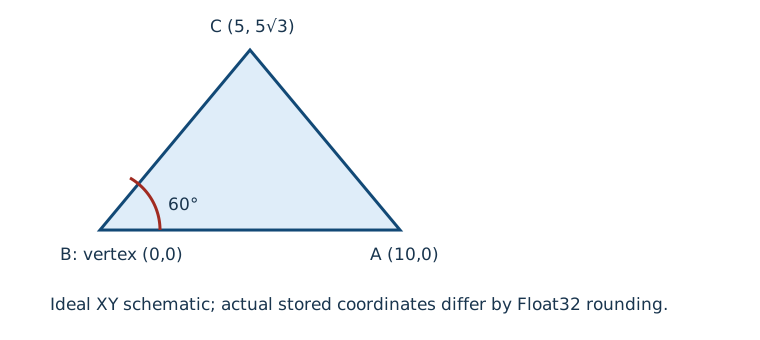
- Download the original angle coupon. Open it deliberately in the viewer or choose the Repeatable feature angles example. Loading a fixture does not start server analysis.
- The triangular prism has top references A=(10,0,0), B=(0,0,0), C=(5,5√3,0). Use Mesh vertex and select the three visible top corners in that order. Use the separate distance coupon for the 30-40-50 check.
- Review the point list. B must be the origin corner, not the apex. The stored C coordinate is about 8.66025447845459 on Y. Running the actual angle calculation on reopened Float32 records gives about 60.0000012623 degrees. This small difference from ideal 60 is serialization precision, not physical error.
- Name the measurement, choose Save measurement, and Download measurements (JSON). Compare the selected coordinates and basis with the manifest and calculation observations.
The unknown STL unit does not prevent a valid angle. A uniform interpretation or conversion changes lengths, not the angle. For a length on the distance coupon, (0,0,0) to (30,40,0) is 50 coordinate units with absolute XYZ differences 30,40,0. Establish the source unit before calling that 50 mm.
In local browser checks on 31 October 2026, normal mesh-vertex picks at desktop and mobile widths displayed 60.0000013 degrees. The saved desktop selection uses the other base corner as B, which gives the same angle for this equilateral control. Its actual unknown-unit download retains the full numerical result and explicitly unknown source unit. Reset, zoom and fullscreen checks preserved geometric values. See the browser observation record for exact tested interactions and limitations; mobile width used mouse input, not a physical touchscreen.
Use vertex picks deliberately
Surface point selects an arbitrary visible triangle location. Mesh vertex considers only the three vertices of the nearest eligible hit triangle, ranked by projected pointer distance within 24 CSS pixels, or 40 for touch. It is a bounded interaction aid, not a global vertex search, edge detector or estimate of measurement uncertainty. Move toward a visible corner if none is offered; there is no automatic fallback to a surface location.
Hover shows a green candidate marker. The candidate buttons provide keyboard selection after targeting a triangle. Undo last point lets you replace a mistaken C without starting again. The optional coordinate fields provide a keyboard-only alternative, but their entries are explicitly recorded as Entered coordinates. They do not prove that any entered point lies on the mesh.
Move the camera, keep the geometry
Orbit, zoom, Reset view and fullscreen change the view rather than the stored geometric references. The red legs join A-B-C; B has a blue marker. The displayed screen angle can look narrower under perspective even though the three-dimensional angle is unchanged. Compare the translated, tilted coupon: its transform is (x+100, 0.6y-0.8z-40, 0.8y+0.6z+25). Reopened points retain approximately the same angle, subject to Float32 rounding. The three-times scaled coupon changes distances by three while preserving angles.
Understand unavailable results
A repeated B/A or B/C leaves a zero-length leg and no defined angle. Numerically unresolved legs at the coordinate scale also return Unavailable with a reason. Opposite nonzero rays are different: A=(-10,0,0), B=(0,0,0), C=(10,0,0) gives 180 degrees. Same-direction nonzero legs give 0. Circle construction rejects collinearity, but Angle does not reject these valid limiting angles.
The implementation uses atan2 of cross-product magnitude and dot product after normalizing the legs. Its thresholds are numerical policies, not a manufacturing tolerance. The exact rule and stress tests are retained with the reproducible evidence.
Retain the basis and choose the next check
A saved entry contains ordered source/build coordinates, selection provenance, available results or an unavailable reason, unit assumptions and placement IDs where present. STL display centering is restored to its source frame. The 3MF Viewer instead uses resolved build coordinates in millimetres and records the declared source unit separately. Points from different placements measure their build arrangement, not the resource's local feature.
Keep the source file yourself: JSON deliberately excludes its filename and geometry and cannot authenticate a revision. Successful file replacement clears the in-memory record after a warning; download first. For a different question, use the general measurement chooser, constructed hole diameter guide, source CAD, actual slicer placement or calibrated physical inspection.
Evidence and terminology
Original controls and actual production-calculation observations were generated on 31 October 2026. Download the generator and manifest to reproduce stored coordinates and hashes. There is no physical print or calibrated metrology claim. Autodesk's measurement reference, reviewed on that date, distinguishes side-vertex-side angles and three-point circles; its other measurement capabilities are not implied here.