
Mesh opening interpretation
Measure a Hole Diameter in an STL File
A distance across a mesh opening and a circle through three selected points answer different questions. A faceted bore can produce a 20 mm circle through its vertices while leaving less than 20 mm between its flat sides. Establish the unit, choose points on the intended section and keep the construction separate from source CAD dimensions and the printed fit.
Use the STL Viewer for Distance or Circle through 3 points. This circle passes through the three selected points. It does not detect a cylinder or prove that the opening is round. There is no automatic minimum-clearance, section extraction or roundness check.
Choose distance or a constructed circle
| Quantity | Meaning and limitation |
|---|---|
| Point distance | A chord between two selected locations, possibly not the largest span or intended section. |
| Constructed diameter | Twice the circumradius through three noncollinear points in their plane. It describes those points only. |
| Clear section or passage | A boundary-wide or swept-volume question. The new modes do not solve it. |
| CAD nominal diameter | An analytic source-design parameter. A tessellated file may approximate it. |
| Produced bore reading | A physical result depending on process, orientation, location and measurement method. |
Compare the polygonal bores
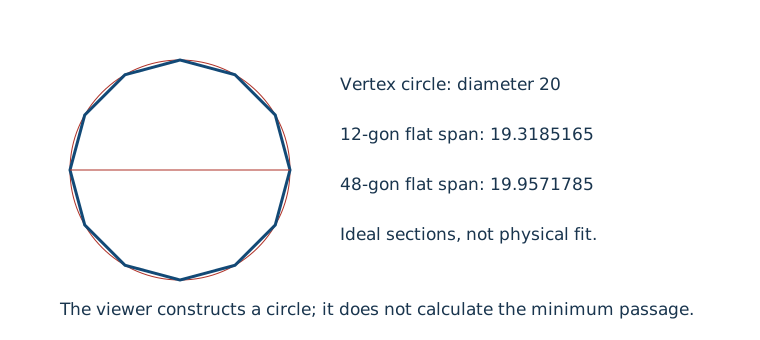
Download the 12-sided bore and 48-sided bore. Each is an original closed material boundary with a straight-through Z opening, Z=0..8, and the same 30 by 30 outer square. Interpret STL coordinates as millimetres only for this documented control. The ideal opening vertices lie on radius 10, starting at +X.
| Opening | Circle through boundary vertices | Flat-to-flat span |
|---|---|---|
| 12 sides | 20 | 20 cos(π/12) = 19.3185165258 |
| 48 sides | 20 | 20 cos(π/48) = 19.9571784648 |
- Choose Circle through 3 points, Mesh vertex, then Start measuring. At one opening rim select (10,0,0), (0,10,0), (-10,0,0), or the corresponding points all at Z=8. These are indices 0, n/4, n/2 in the manifest. Review the actual selected coordinates rather than assuming a screen click was exact.
- Constructed radius is approximately 10 and diameter 20 for these reopened stored cardinal points. Save the record and retain its point references. Tiny nonzero cardinal coordinates from trigonometry may remain in the file.
- Compare the smaller analytical flat span. A nominal 20 mm circle through corners is not proof that a 20 mm pin passes through the polygon. A different construction through three 12-gon flat midpoints would give about 19.3185; the viewer has no midpoint snap and free surface picks must retain their actual locations.
Both bores have matching outer bounds. A dimensions checker cannot distinguish their internal flat span. The chord-height guide owns the tessellation derivation: diameter deficit here is twice the radial sagitta. More facets reduce this ideal deviation but do not establish physical fit.
Actual local viewer checks on 31 October 2026 selected the three cardinal rim vertices at Z=8 on each file. Both displayed Constructed radius 10 mm and Constructed diameter 20 mm. Download the actual 12-sided record and 48-sided record to review exact coordinates and mesh/face/vertex references. These are viewer constructions; the smaller flat spans in the table remain independent analytical values.
Use separated points on the intended section
Choose references widely separated around the intended opening rim. Three points also define their own plane: mixing locations at different axial heights can construct a mathematically valid circle in a plane irrelevant to the intended section. The viewer cannot infer your design datum or which section you meant.
Repeated, collinear or numerically unstable near-collinear points return Unavailable. Keep the points, use Undo last point and replace the unsuitable reference. A very large radius from almost straight samples is not useful evidence; the documented conditioning rule rejects that case. It is a numerical policy rather than a universal physical tolerance.
Visual clipping hides geometry only. It creates no cap, analytic curve, snap target or measured section boundary. You can select remaining visible source triangles and vertices near a cut, but cannot pick an invented clipping contour. Read the cross-section workflow before interpreting a clipped view.
A circle can be constructed on an ellipse
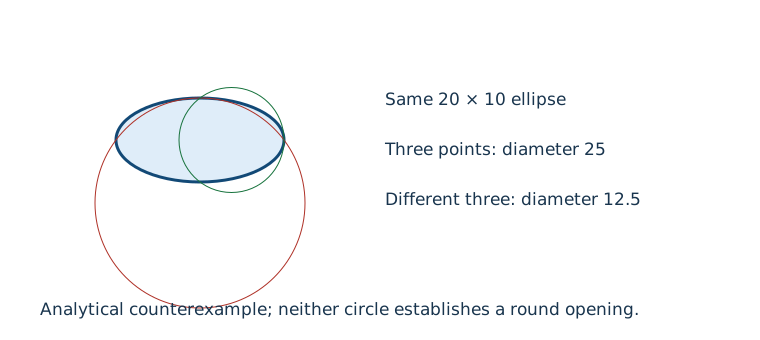
Open the extruded ellipse control, with ideal section x=10 cos(t), y=5 sin(t). All references below use Z=0. The actual production calculation on its reopened cardinal references yields:
| Chosen references | Constructed radius | Constructed diameter |
|---|---|---|
| (10,0), (0,5), (-10,0) | 12.5 | 25 |
| (10,0), (0,5), (0,-5) | 6.25 | 12.5 |
Save both selections under distinct names. Neither diameter equals the ellipse's 20 by 10 span. Three points leave no additional samples to establish circularity: passing exactly through them supplies no confidence score or validation of the rest of the bore. The calculation observations distinguish the implemented results from the ideal polygon arithmetic.
The actual viewer was also run on the ellipse with those cardinal triples at Z=8. It displayed diameters 25 mm and 12.5 mm. The two-entry viewer download retains both constructions, full numeric values and selected vertex references. One nearby selection initially chose a neighbouring rim vertex and produced about 23.9626 mm; reviewing the point list and replacing it with the intended cardinal reference gave 25 mm. That selection dependence is why the exact point record matters.
Keep source and printed evidence separate
Compare three records before compensation: the intended CAD feature, the serialized and reopened mesh, and the produced part under a stated physical method. Tessellation, orientation, seam, support, material and process can contribute to disagreement. A mesh construction alone cannot assign the cause or recommend a universal offset. Use the hole compensation workflow and orientation and accuracy guide for the physical investigation.
Save the basis and choose the next action
JSON records retain ordered points, selection basis, centre, plane basis, units and unavailable reasons. Coordinates are restored to the STL source frame; camera orbit and fullscreen do not change the geometry. Unknown STL units leave physical length unavailable while coordinate lengths remain useful. Changing the source interpretation recomputes physical lengths; converting the output display merely changes units.
The 3MF Viewer supports the same constructions in resolved millimetre build coordinates. Keep each placed-item ID; a circle spanning several placements is not automatically one resource's hole. Start with the general measurement guide if your question is actually outer size, CAD intent or physical inspection.
Reproducibility and sources
Controls and actual calculation observations were generated on 31 October 2026. The manifest supplies point indices, transforms, original provenance, hashes and limitations; the generator reproduces the assets. These are software controls, with no printed fit or calibration test. Autodesk's measurement reference, reviewed on that date, distinguishes three-point construction from automatic circle detection. InspectMesh implements the construction described here.