
File diagnosis with owned examples
Why Is My STL Volume Wrong or Unavailable?
Substantially updated 2026-10-27. First published 2026-10-07.
First confirm units and whether the mesh supports a solid-volume calculation. Open boundaries, inconsistent winding and ambiguous shells can make a number meaningless. InspectMesh collection reports use an unavailable result for failed volume screens rather than displaying zero as if a solid had been measured.
Interpretation and scaling give different reproducible numbers
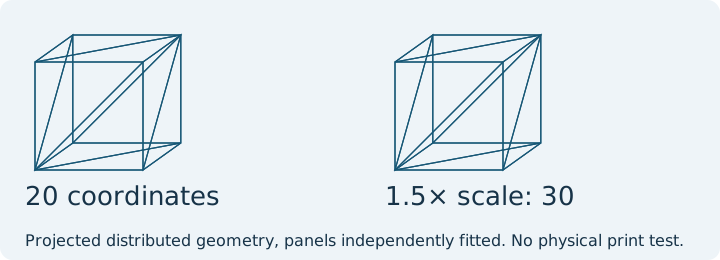
| Operation on the closed control | Linear span | Volume interpretation |
|---|---|---|
| Original, mm assumption | 20 mm | 8,000 mm³ |
| Same original bytes, inch assumption | 508 mm | 131,096,512 mm³ = 8,000 × 25.4³ |
| Save a 150% scaled copy; reopen as mm | 30 mm | 27,000 mm³ = 8,000 × 1.5³ |
| Face-removed copy, mm assumption | 20 mm bounds | Unavailable, not zero |
Actual scale export/re-import retains 12 triangles and gives 30-coordinate spans. The 3.375 volume factor applies to a valid closed solid, not a reliable volume for an open surface. Use the same known control to check the receiving application's unit before trusting a volume or using it for material planning.
Signed volume and winding
A triangle mesh calculation accumulates signed tetrahedron contributions relative to the origin, divided by six. Reversing every face of a consistent closed shell reverses the algebraic sign. That negative sign indicates orientation in this calculation, not negative physical material. Inconsistent local winding can cancel contributions and should be investigated instead of hidden by taking an absolute value immediately.
The collection checker first screens edge incidence, degenerate/duplicate triangles, winding conflicts and connected shells. It reports the magnitude for a supported, consistently wound single closed shell. It does not expose a negative physical-volume result. Multiple shells deliberately fail its conservative solid interpretation; self intersections are not checked, so passing these screens still does not certify a valid solid.
| Observed result | Check next | Decision |
|---|---|---|
| Unavailable | Boundary edges, degenerates, duplicates, winding and shell count | Correct known faults; never substitute zero |
| Implausibly large/small | Known linear dimension and STL unit assumption | Correct scale only after confirming intended units |
| Negative in another application | Its signed-volume convention and global winding | Inspect orientation; distinguish raw signed sum from physical volume |
| Zero or tiny on a nonempty model | Open surfaces, cancellation, self intersections or negligible extent | Return to CAD if solid interpretation is unclear |
| Several overlapping shells | Intended union, cavities and intersecting surfaces | Do not add their volumes blindly |
Name the method and distinguish a passage from an unfinished surface
Record which tool produced the value. The local collection screen and server processor use their own connectivity and validity policies. Agreement on dimensions does not imply both methods will publish the same volume state. Neither a positive signed sum nor a closed boundary proves the intended solid interpretation.
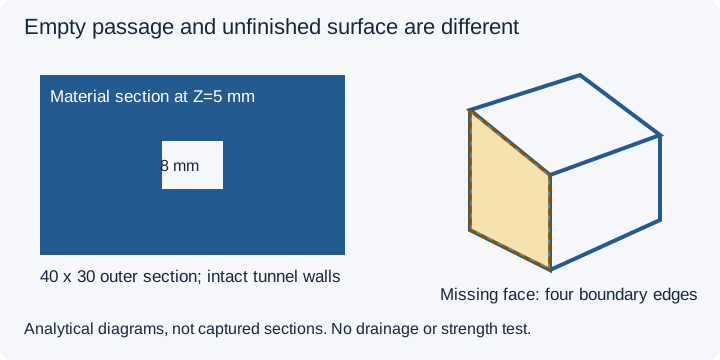
| Owned control, mm convention | Analytical expectation | Actual observations by method |
|---|---|---|
| Closed 20 mm cube, 12 triangles | 8,000 mm³ | Local collection: zero open edges, 8,000 mm³. Local server-processor code path: zero open edges, approximately 8,000 mm³. |
| Missing-face cube, 10 triangles | Unfinished material boundary | Both named local methods: four boundary edges; volume unavailable. |
| 40 × 30 × 10 mm block, 8 mm square through-opening, 32 triangles | 12,000 − 640 = 11,360 mm³ material | Both named local methods: zero open edges; approximately 11,360 mm³ material volume. |
Download the through-opening block and missing-face cube. Captured 27 October 2026: local collection functions and local .NET processor. The latter is the server's processor code path run locally, not a deployed endpoint observation. A designed passage is empty space bounded by intact material surfaces, unlike a missing mesh face. These controls establish no physical flow, drainage or strength.
For a designed cavity, follow the hollow-design decision, then inspect its interior with visual clipping. Do not subtract unsigned arbitrary shell volumes to infer a cavity.
Recheck after a correction
- Keep the original; record bounds and the application/unit settings that produced the number.
- Run topology and dimension review; locate the actual fault.
- Correct the source solid or a clearly understood mesh defect on a copy.
- Compare revised surfaces and verify known dimensions, not just total volume.
- Inspect the resulting solid and sliced layers in the intended application.
Solid volume is not slicer material use
Geometric volume assumes a solid interpretation. Slicer material includes walls, infill, supports and purge, according to settings; hollow interiors may use less while supports add material. Use the actual sliced consumption for a quote or spool decision. Read filament-use guidance and avoid using model volume as a complete job estimate.
Method basis: the application tests verify owned closed/open cube controls and inch scaling. The 3MF Core Specification supplies unit/mesh context when comparing with declared-unit packages; STL requires its own assumption. Source review: 7 October 2026. These are software and arithmetic controls, without physical measurements.
FAQ
Does unavailable volume mean zero volume?
No. It means the mesh did not pass the supported solid-volume screen, or solid interpretation is unresolved.
Why does an inch mistake change volume so much?
Volume scales with the cube of the linear scale factor. An inch-to-millimetre factor of 25.4 becomes 16387.064 for volume.