
STL surface diagnosis
Why Does My STL Surface Have No Thickness?
An STL can contain a triangle sheet that looks like a wall in a two-sided viewer but encloses no material. A thin plate is different: its front, back and sides form a closed surface with a real separation. Check the original mesh and the first sliced layer before changing line width or asking a repair tool to invent the missing side.
Sheet versus plate
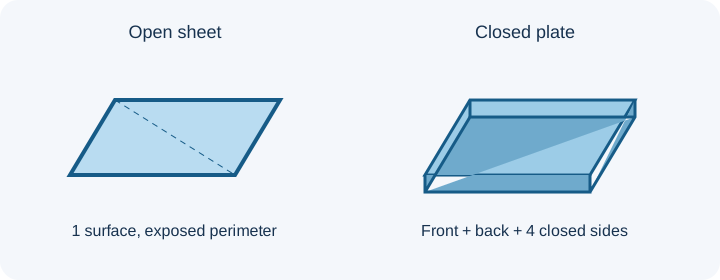
| Download | Coordinates and triangles | Actual mesh check | Solid-volume interpretation |
|---|---|---|---|
| Horizontal sheet | 20 × 20 × 0; two triangles | Four boundary edges, one server vertex-component, no winding conflict | Volume unavailable because the sheet is open; a signed triangle sum would not represent enclosed material. |
| Vertical sheet | 20 × 0 × 20; two triangles | Four boundary edges, one component | Also open; nonzero Z span does not create thickness. |
| Closed plate | 20 × 20 × 1; 12 triangles | Zero boundary and over-shared edges, no winding conflict | 400 cubic coordinate units from the known closed control. |
These are mathematical controls measured in the InspectMesh processor. STL carries no unit, so “mm” applies only if you choose that interpretation. An edge check does not measure arbitrary wall thickness; the 1-unit separation is known from this fixture's coordinates.
Check the source before the slicer
Download both controls without uploading a model. Open each in the local STL Viewer, choose Inspect cross-section, select Z for the horizontal sheet and plate, and move the slider through the displayed bounds. Rotate the plate to see its side closure. Then explicitly submit each example to the quality checker or boundary checker if you want the server report. The sheet's rendered face can be visible from both sides, but its four open edges mean it does not enclose a solid. See the cross-section controls for the exact viewer steps.
Check what your selected slicer generated
Import each downloaded STL as a separate object with the same chosen unit and profile. Record the slicer name, version, nozzle, layer height and any surface-processing mode. Compare the first layer, a middle layer and exported G-code model extrusion. If the sheet disappears, the profile did not create a printable region from that source; if a surface mode prints it, that is a profile-specific interpretation, not enclosed source volume. No slicer output is claimed for these two new fixtures here.
Choose the correct edit
If a physical plate is intended, add front-to-back separation and closed sides in source CAD or by a deliberate mesh extrusion with a controlled direction. Re-export under a new filename and recheck the actual output. If the part is already closed but too thin for the chosen profile, use the wall-thickness workflow and only then test thin-wall settings. If a sheet is intentional for a non-solid output, preserve it. Standard STL cleanup cannot invent its missing back and side walls; for a boundary that should be sealed, use the open-edge workflow after confirming design intent.
FAQ
Can a watertight model still be too thin for my profile?
Yes. The closed plate has a real 1-unit separation, but whether a chosen extrusion profile prints it requires layer preview. The edge test does not decide process limits.
Will automatic duplicate cleanup give a sheet thickness?
No. Removing repeated triangles cannot create a back face or close the four exposed perimeter edges of the sheet control.