
STL topology guide
How to Tell If an STL File Is Watertight
Substantially updated 2026-10-29. First published 2026-09-05.
Check whether triangle edges have a neighbour. An exposed edge belongs to only one face and marks an open boundary under this mesh check. A result of zero open edges supports closure, but it does not prove correct design, non-intersection or printability. Use the STL Watertight Checker to inspect your exact file.
Establish the meaning with two controls
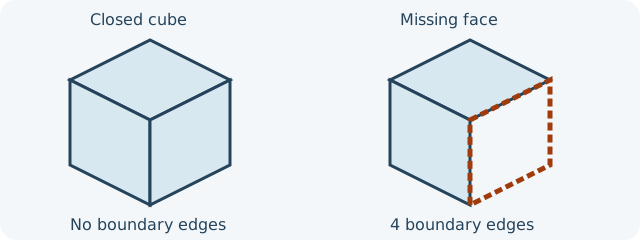
The closed 20-unit cube has 12 triangles and zero boundary edges. The open-face copy deletes two triangles and has four boundary edges. Under a millimetre assumption, local preflight screens the closed cube's volume at 8,000 mm³; volume is unavailable for the open copy. STL itself contains no length unit. Recheck both controls before interpreting a report on a more complex design.
Interpret closure alongside other findings
| Result | What it establishes | Next check |
|---|---|---|
| Open edges above zero | At least one boundary is exposed under the checker's coordinate and edge rules. | Locate the loop and compare it with intended design; choose whether to patch. |
| Zero open edges, one shell | No boundary was found by this method. | Check orientation, non-manifold edges, intersections, dimensions and sliced layers. |
| Zero open edges, several shells | Each surface may be closed, but the file has separate components. | Identify intended parts, nested shells and overlaps; do not delete them by count alone. |
| Malformed parse or check unavailable | No valid zero finding exists. | Re-export the source and rerun the check. |
A thick-walled vessel's inner and outer walls can meet around an open mouth and still form a closed material surface. A passage drilled through a solid can likewise have closed material walls around the empty space; it is not the missing face shown by the cube control. A single uncapped sheet has exposed edges. A hidden internal shell or self-intersection can remain even with zero open edges. The broader preflight reports other supported checks and their unavailable or sampled states.
For several findings, use the broad report-triage guide before choosing a supported correction. Closure alone does not select a repair.
Recheck the file you will slice
- Keep the original and record the location and count of the reported boundary.
- Repair only a surface whose intended shape is known, preferably in source CAD for functional geometry.
- Open the saved derivative, rerun closure and topology checks, then inspect the affected slicer layers and dimensions.
Watertightness is one property of a surface. It does not measure wall thickness, support, printer fit, material behaviour or the outcome of a physical print.
FAQ
Is zero open edges a printability result?
No. It is a closure finding under the check method; geometry, slicing and physical suitability need separate review.
Can two separate closed shells have zero open edges?
Yes. Closure and component count answer different questions; inspect whether both solids are intended and whether they overlap.