
STL file guide
What Is an STL File?
Substantially updated 2026-10-27. First published 2026-09-05.
An STL represents a surface with triangular facets. Each facet records three corner coordinates and a normal vector. Software interprets how those triangles meet and whether they form a usable solid; the file is not a CAD feature tree or a printer job.
What one facet records
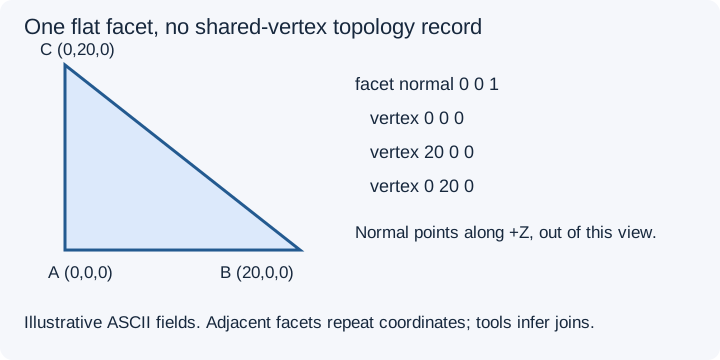
In the illustrated facet, A=(0,0,0), B=(20,0,0) and C=(0,20,0). Their order gives a +Z winding-derived normal. An adjacent facet writes its own three positions rather than pointing to a shared-vertex table. A tool must match coordinates under its connectivity rule to infer which edges and surfaces meet.
The stored normal and the orientation derived from vertex order can disagree. Applications may recompute normals; a smooth-looking preview does not establish consistent winding or a closed surface. Follow orientation diagnosis for that separate finding.
One cube explains surface versus solid
The owned closed 20-coordinate cube has two triangles per face, or 12 facets. Its coordinates run from 0 to 20 along each axis. Interpreted as millimetres, a consistent closed material boundary encloses 8,000 mm³. The file does not contain a cube feature, a density or instructions for printing it.
Removing the two triangles from one square face gives the 10-triangle missing-face control. It still has 20-unit outer bounds, but four boundary edges leave its surface unfinished. Local collection checks leave its enclosed volume unavailable, rather than treating the displayed surface as a measured solid.
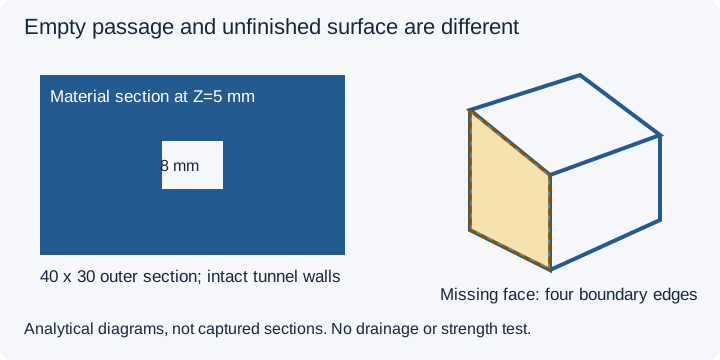
A deliberately modelled tunnel can have complete material surfaces around its opening and no exposed mesh edges. Zero open edges alone does not tell you whether that tunnel matches the design, drains a cavity or prints successfully. Volume interpretation and cavity design address those different questions.
Coordinates, units and information absent from STL
STL coordinates define locations in a frame, so a surface can remain far from the origin. It lacks a standard unit declaration and separate editable placement records, named assembly hierarchy, standard textures/material assignments and native CAD history. An off-origin location is different from a retained build transform.
A coordinate of 50 could mean 50 mm or another agreed unit. Check a known dimension before resizing. Use the unit interpretation guide and the off-build-plate coordinate guide for these separate decisions.
Facets and encodings
Each triangle is flat. A planar face can need few triangles; a curve is already approximated by facets before import. Adding triangles later does not recover the original analytic curve. Return to the source for a better export when detail is missing.
ASCII and binary STL encode the same kind of facet data. ASCII is readable text; binary uses a header, count and fixed-size records. Binary is often smaller, but encoding is different from geometric simplification. See ASCII versus binary STL for the storage and precision basis.
Choose the next task
Use STL Viewer to display the known cube or received surface locally before interpreting a specific finding.
Open the STL locally to see its surfaces and check size. Use the diagnostic guide for a specific finding. For design edits, preserve and return to the source CAD workflow. A successful load is an inspection step, not certification of a physical print.
Structure source reviewed 27 October 2026: Library of Congress STL format description. The cube and passage are owned software controls; no physical tests are implied.
FAQ
Does STL store how every triangle connects?
It records facet coordinates, not an indexed shared-vertex topology or assembly hierarchy. Software infers connections using its coordinate matching and connectivity rules.
Does STL contain units or printer settings?
Standard STL has no authoritative unit declaration or printer-profile record. Agree a coordinate convention and use the slicer for the intended printer job.
Does opening an STL prove it is a solid?
No. The missing-face cube still displays, but its unfinished boundary cannot support the same enclosed-volume interpretation as the closed control.